Open and Preview XPS Files with Original Structure
Shefware XPS Viewer Tool is an advanced XPS file viewer to open, read, and preview XPS files without altering the original content. View XPS files' text, images, graphics, and fonts while preserving the original data, without requiring any third-party software.
★ Preview unlimited XPS files in the demo version.
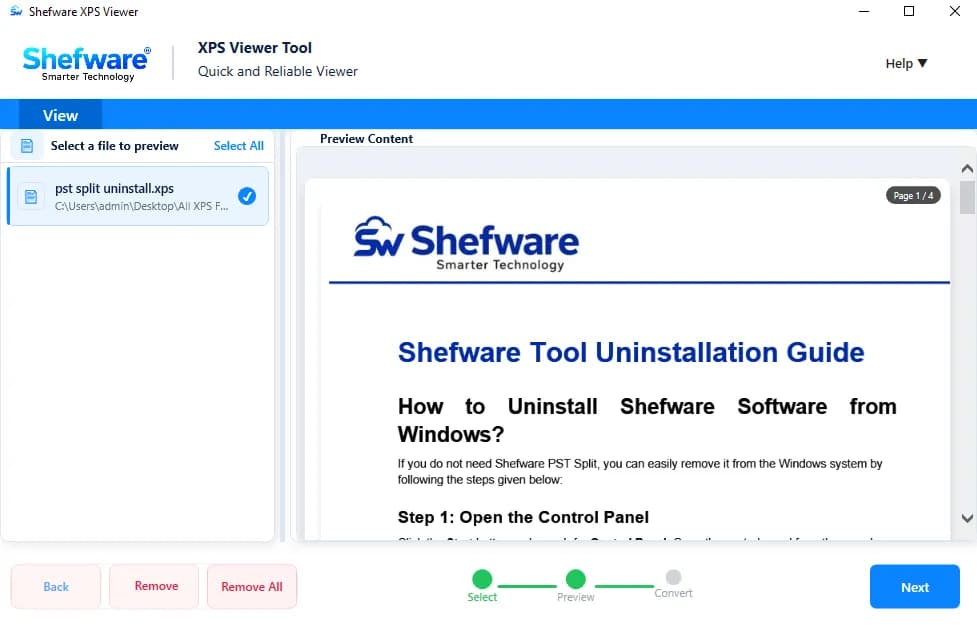
Open and read XPS documents seamlessly with the software.
Preview text, images, and other document structure with this XPS viewer application.
View XPS documents with the original layout, fonts, and formatting.
Upload up to 50 XPS files at once to preview in this XPS viewer application.
Easily navigate through multi-page XPS documents conversion.
Zoom in or zoom out for a clearer document preview.
Safeguard complete XPS file data without any data loss.
Preview unlimited XPS files for free and upgrade to convert them.
Supports all versions of the Windows XPS Viewer, including Windows 10 and Windows 11.
Open and read XPS reports, invoices, forms, and other documents received from colleagues or clients.
Access older XPS files stored on a system or backup without changing the original content.
View XPS files, including layout, text, images, and structure, before starting the printing process.
Read multi-page reports, statements, manuals, or records for easy reading.
Read text, paragraphs, headings, and other information.
View images and pictures within the XPS document.
Preview shapes, diagrams, and other elements.
View document text with its original font and styling.
Read the content in tables while maintaining rows and columns.
View the original content across each document page.
Preview text styles, spacing, and other formatting elements.
Navigate and view multiple pages of an XPS document.
Easily open and read XPS files directly with the software. Upload 50 XPS files at once and access complete document content clearly on the dashboard.
View XPS files, including text, images, graphics, fonts, and other document elements. Review the complete content of an XPS file and verify data accuracy.
Preserve and maintain the original layout, fonts, images, graphics, formatting, and structure without making changes to the content.
Move between pages using simple navigation controls while viewing multi-page XPS documents, without opening or closing the file.
Zoom in to clearly view the document content and zoom out to view the complete XPS page at once.
Use the free trial version to open, read, and view XPS documents. Upgrade to convert the XPS files into multiple formats such as PDF, EPUB, BMP, DOCX, and more.
Download and install Shefware XPS Viewer software on your system. Open XPS Viewer to preview the XPS files.
Click Add Files or add a folder to upload your XPS documents. Upload a single document or multiple documents and process them together.
View XPS files to verify content, formatting, structure, and page layout.
Click Upgrade to get the complete software and convert the XPS files into multiple formats.
Select the desired output format to convert the XPS documents.
Browse and select the destination folder where the converted files will be saved after the conversion process.
Click Convert to start the conversion process. Once completed, verify the converted files and check the detailed report.
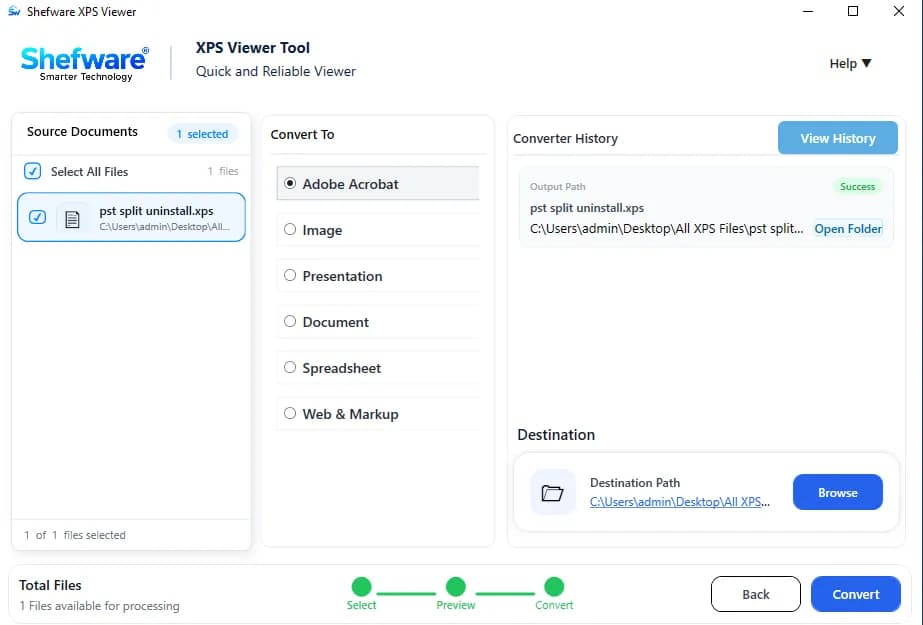
Open and preview XPS files securely without altering the original data using the XPS document viewer tool.
Maintain the original text, images, graphics, fonts, formatting, and document structure while viewing XPS files.
Read and view XPS files directly, including text, images, graphics, fonts, and document formatting.
Read and view XPS documents directly with the software without any third-party application installation.
Open, view, and read large XPS files while maintaining the original content and structure without any size limitations.
| Features | Free Trial | Paid Version |
|---|---|---|
| Open and Read XPS Files | ||
| Preview Unlimited XPS Files | ||
| Add Up to 50 XPS Files at Once | ||
| Preview Text, Images & Graphics | ||
| Preview Fonts & Formatting | ||
| Maintain Original File Structure | ||
| Multi-Page Navigation | ||
| Zoom In & Zoom Out | ||
| Support Large XPS Files | ||
| Convert XPS Files | ||
| Multiple Output Formats | ||
| Save Converted Files to Desired Location | ||
| View Conversion Report |
Download Free Demo & Check System Requirements
Size: 146 MB
Version: 1.0.0.1
Hard Disk
1 GB space required
RAM
Minimum 4 GB RAM (Recommended 8 GB)
Processor
Intel® Core™ 2 Duo CPU E4600 @ 2.40GHz 2.39GHz or above
Operating System - Windows 11, 10, 7(64 bit), Windows Server 2025
Prerequisites - .NET Framework 10
I get frequent multiple XPS files to review properly before proceeding. I choose Shefware XPS Viewer Tool as it easily opens the files, navigates through multiple pages, and examines the complete content.
Technical Support Engineer