Services
Google Workspace to Microsoft 365 MigrationEmail ConversionOffice 365 MigrationTenant to Tenant MigrationCloud BackupTeams Migration
Repair corrupt, damaged, and unplayable videos without losing quality
Restore your damaged videos easily with the Shefware Video Repair Tool. The software repairs corrupt, broken, blurry, choppy, frozen, and unplayable video files while managing the original resolution, frame rate, audio synchronization, and metadata.
★ Video Repair Free Version allows preview and repair up to 30 seconds.



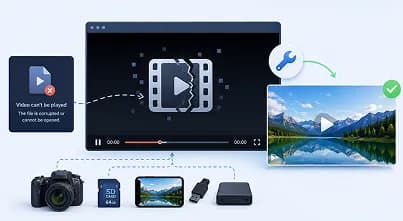
Often, video files cannot be opened after being transferred from a camera, SD card, or mobile device. The tool repairs damaged video structures, permitting files to play normally again.
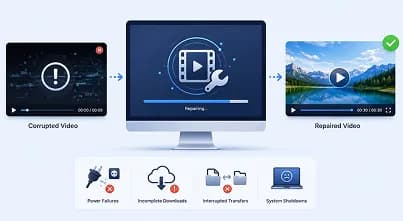
Power failures, incomplete downloads, disrupted file transfers, or sudden system shutdowns may corrupt crucial videos. The software repairs these files while protecting their original content and quality.

Videos gathered on damaged SD cards, USB drives, hard disks, SSDs, memory cards, or external storage devices sometimes become inaccessible. The tool repairs these corrupted videos without changing the original recordings.
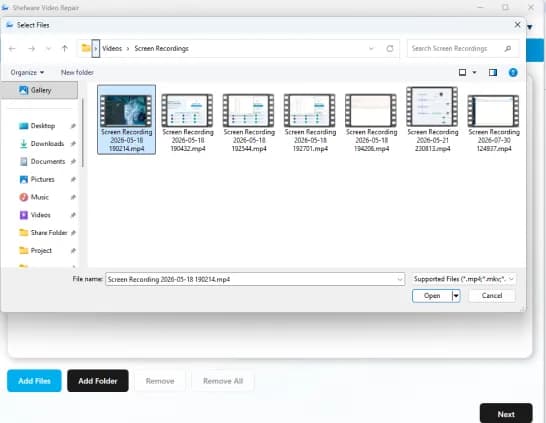
Saves your time by uploading multiple video files or folders for repair. The tool assists batch processing, permitting to repair various damaged videos in one operation. This is suitable for photographers, videographers, and businesses handling large videos.
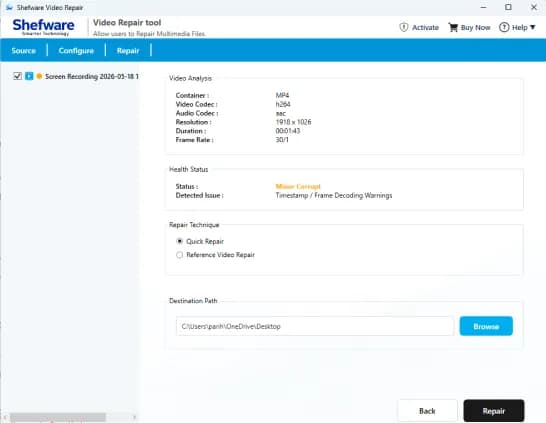
Before beginning the repair process, the tool scans selected videos and shows basic details. You can verify the files you have added and make sure only needed videos are repaired, which reduces processing errors and saves time.
Assists a huge range of famous video formats and MP4 video repair free containing MOV, AVI, MKV, WMV, M4V, FLV, ASF, MPEG, MPG, 3GP, MTS, WEBM, M2TS, TS, and other formats. If your videos are recorded on smartphones, DSLRs, drones, and CCTVs, the tool repairs them easily.
Repair videos gathered on damaged or corrupted storage devices containing SD Cards, USB flash drives, external hard disks, SSDs, memory cards, DVRs, NAS devices, and others. The software restores inaccessible videos not where originally stored.
Provides "Quick Repair" to fix minor corrupted videos and "Reference Video Repair" for severely damaged video files. The tool ensures reliable results while preserving the original video quality. Add a reference video from the same device for precise restoration.
Repair videos recorded in multiple resolutions, containing HD (720p), Full HD (1080p), 2K, 4K, 5K, and even 8K recordings. The software is developed to manage large video files while maintaining optimal performance.
Choose your preferred destination folder to save the repaired video files after the repair process. This feature helps you organize and access restored videos easily without overwriting the original files.
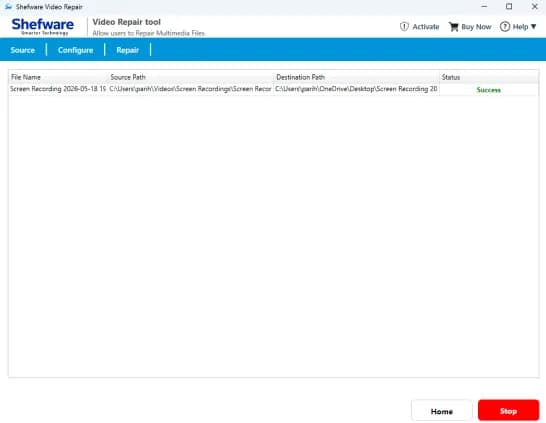
Maintain an overall record of previously repaired videos using the repair history feature. You can review repair status, source file location, destination path, completion time, and other information, making it easier to handle future repair tasks.

Restore videos that won't open or play in any media player due to a corrupted file.

Repair videos that display a black screen while preserving the original content.

Fix videos that freeze, stop unexpectedly, or become stuck during playback.

Eliminate stuttering, frame drops, and lag for simple video playback.

Repair blurry, pixelated, or distorted videos while managing visual quality.

Correct audio delays and sync issues to ensure smooth playback.

Restore damaged or missing audio tracks without impacting video quality.

Fix videos showing "Unsupported File Format" or playback errors caused by corruption.

Recovering videos damaged by malware, storage corruption, power failures, or disrupted file transfers.
The software scans each video to find the type and severity of corruption before starting the repair process.
Easily find minor and major corruption with color-coded indicators: yellow for minor issues and Red for severe corruption.
Repair damaged videos while maintaining the original resolution, frame rate, audio quality, and overall file integrity.
The tool works with Windows 11, 10, 8.1, 8, 7, and Windows Server editions, making sure smooth performance on supported systems.
| Features | Free Demo Version | Full Version |
|---|---|---|
| Add Single or Multiple Video Files | ✓ | ✓ |
| Add Complete Video Folder | ✓ | ✓ |
| Analyze Video Corruption | ✓ | ✓ |
| Detect Minor & Major Corruption | ✓ | ✓ |
| Color-Coded Corruption Status | ✓ | ✓ |
| Quick Repair Mode | ✓ | ✓ |
| Reference Video Repair | ✓ | ✓ |
| Repair Multiple Video Formats | ✓ | ✓ |
| Repair Videos from Cameras, Drones & CCTV | ✓ | ✓ |
| Supports HD, Full HD, 2K, 4K, 5K & 8K Videos | ✓ | ✓ |
| Choose Custom Save Location | ✓ | ✓ |
| Repair History Management | ✓ | ✓ |
| Preserve Original Video Quality | ✓ | ✓ |
| Windows Compatibility | ✓ | ✓ |
| Save Repaired Videos | Download up to 30 Seconds | Unlimited |
| Free Software Updates | ✗ | ✓ |
| Priority Technical Support | ✗ | ✓ |
Download Free Demo & Check System Requirements
Size: 122 MB
Version: 1.0.0.1
Hard Disk
1 GB space required
RAM
Minimum 8 GB RAM (Recommended 16 GB)
Processor
Intel® Core™ 2 Duo CPU E4600 @ 2.40GHz 2.39GHz or above
Operating System - Windows 11, 10, 8.1, 8, 7 (32-bit & 64-bit), Windows Server 2025
Prerequisites - .NET Framework 4.8 or higher
The Shefware Video Repair Tool recovered several corrupted wedding videos from an SD card that I thought were permanently lost. The video quality remained intact, and the repair process was incredibly fast.
Professional Videographer