Convert Video Files to MP4, AVI, MKV, and More Formats
Convert your video files quickly and effortlessly into popular formats with a reliable tool. Enjoy smooth, high-quality conversions with support for multiple video formats.
★ Convert videos up to 15 seconds in the free trial version.
A comprehensive utility engineered to convert video files swiftly, extract high-fidelity soundtracks, and format videos for any device without compromising quality.
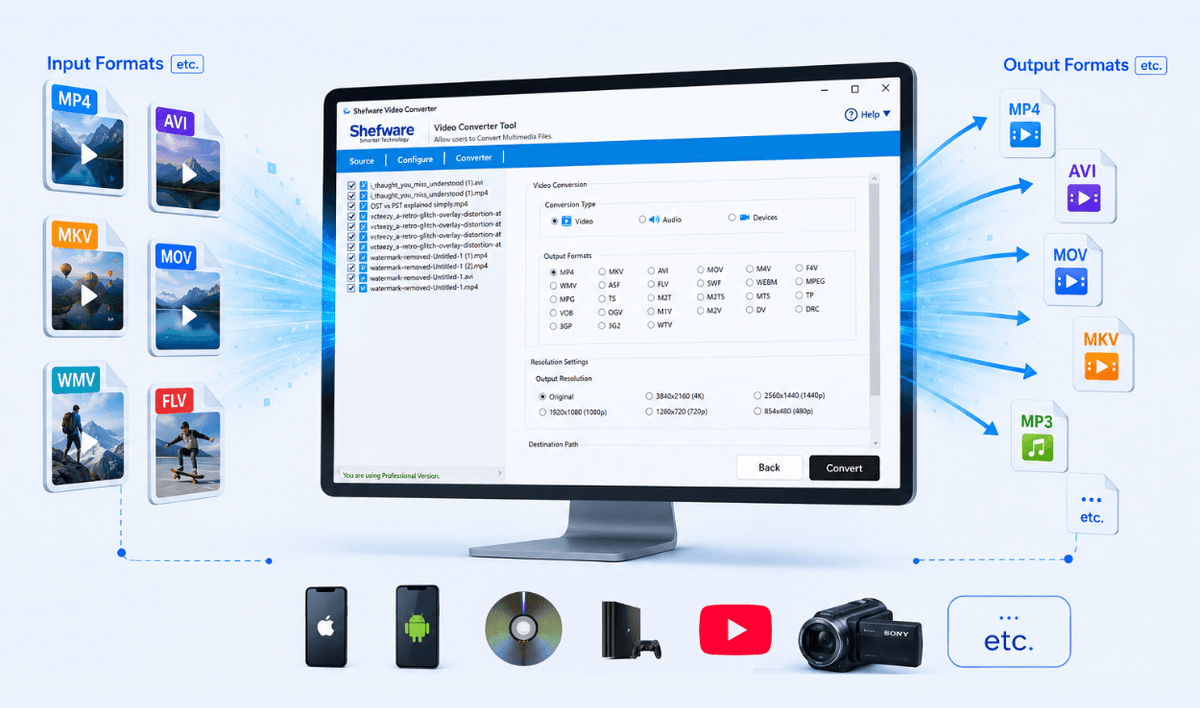
We support seamless conversion between the most widely used multimedia formats and popular devices.
Solve common audio and video playback issues, file size constraints, and compatibility hurdles instantly.
Sometimes videos fail to play because the media player doesn't support the file format. Use the Shefware Video Converter to convert videos into widely supported formats like MP4, AVI, MOV, or MKV for smooth playback.
Different smartphones and tablets need different video formats. Convert your videos into device-enhanced formats for Apple, Android, Samsung, Google Pixel, Xiaomi, Sony, and other devices.
Need only the soundtrack from a video? Convert video files into MP3, WAV, AAC, FLAC, or other audio formats for music, podcasts, interviews, lectures, or voice recordings through a video to audio converter.
Large video files consume significant storage space and are difficult to share. Convert videos into efficient formats while maintaining excellent quality to save storage and simplify sharing.
Quickly convert video file to MP4 format. MP4 is the most common file type, so a video converter MP4 will permit you to share your content with audiences.
Convert to MP4
Convert MOV to MP4
Convert AVI to MP4
Convert WMV to MP4
Convert MKV to MP4
Convert MPEG to MP4
Convert 15 second video free to another format
Everything you need to handle video, audio, and device conversions with maximum precision and high fidelity.
Convert multimedia files to multiple video formats, including MP4, AVI, MOV, MKV, WMV, FLV, MPEG, WebM, and more. This ensures compatibility with virtually every media player and editing application.
Convert video files directly into audio formats such as MP3, AAC, WAV, FLAC, WMA, OGG, OPUS, AC3, and more. Perfect for music, podcasts, lectures, and voice recordings.
Convert multiple video files simultaneously without repeating the same process. Batch conversion saves valuable time and increases productivity.
Automatically upgrade videos for popular devices including Apple iPhone, Android phones, Samsung devices, Smart TVs, Google Pixel, PlayStation, Xbox, DVD players, and YouTube uploads.
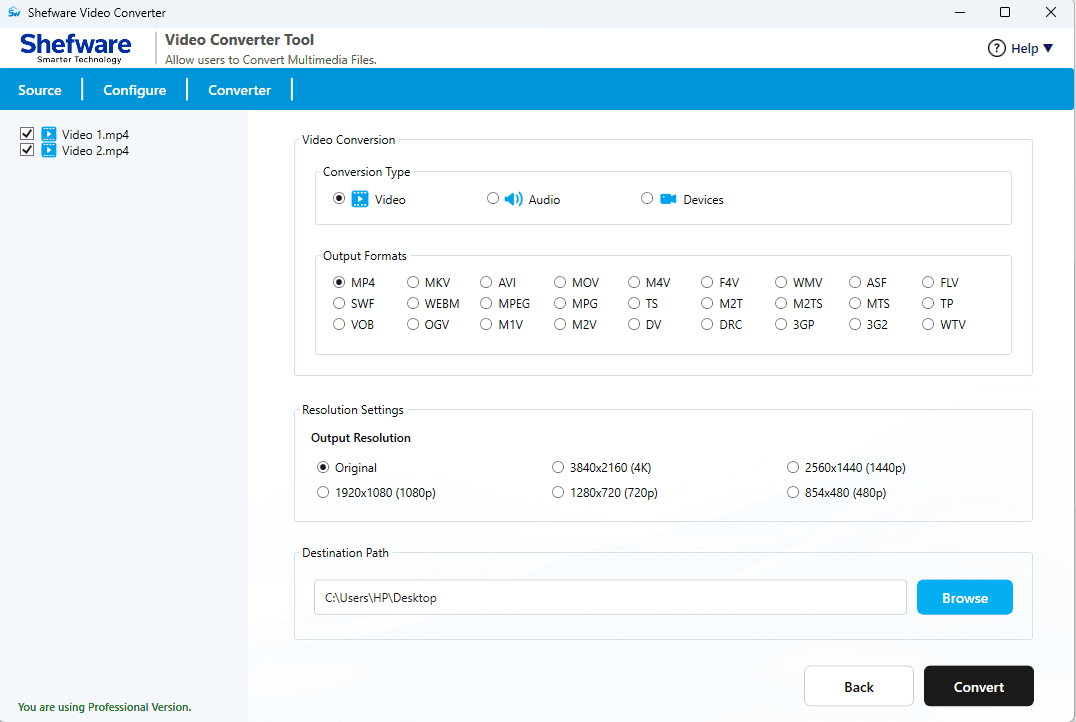
Choose the output quality that best fits your requirements. Supported resolutions include: Original Resolution, 3840 × 2160 (4K), 2560 × 1440, 1920 × 1080, 1280 × 720, 854 × 480.
Customize the output audio quality with bitrate options, including: Auto, 96 Kbps, 128 Kbps, 192 Kbps, 256 Kbps, 320 Kbps, 512 Kbps.
The software intelligently converts videos while preserving frame quality, audio synchronization, aspect ratio, and visual clarity.
Convert HD, Full HD, and 4K videos into your preferred format while maintaining sharp visuals and clear audio. Enjoy smooth playback with excellent output quality.
Watch our step-by-step video tutorial to understand how the software works and get started quickly.
Our tool is designed with a simplified, 4-step workflow that provides rapid, error-free conversion.
Download the software and click Add Files or Add Folder to import one or multiple video files.
Review the file name, size, modification date, and file location before proceeding.
Select the preferred conversion mode from Video Conversion, Audio Conversion, and Device Conversion.
Select the desired output format, resolution, or bitrate, and browse the destination folder for saving converted files.
Click the Convert button to begin the conversion process.
The software shows the real-time progress and conversion status for each selected file.
Once the conversion is finished, the software shows a success notification.
Review the output details, access the converted files from the destination folder, or return to the home screen for another conversion.
We focus on delivering high-fidelity outputs, blazing-fast processing speed, and extreme ease of use.
Convert videos quickly using an upgraded conversion engine developed for maximum performance.
Maintain the best video and audio quality during every conversion.
Developed for both technical and non-technical users.
Get help from our experienced technical support team whenever required.
See how Shefware stack up against online tools and other competitors.
| Features | Online Video Converter | Shefware Video Converter | Other Tools |
|---|---|---|---|
| Batch Video Conversion | |||
| Supports various Video Formats 25+ (Source) | Limited | ||
| Supports various Video Formats 25+ (Destination) | Limited | ||
| Extract Audio from Video | Limited | ||
| Device-Specific Conversion | Limited | ||
| HD & 4K Video Support | Limited | ||
| Preserve Original Quality | Limited | ||
| Resolution Selection | Limited | ||
| Audio Bitrate Selection | |||
| Large File Support | Limited | ||
| Offline Conversion | |||
| Secure Local Processing | |||
| Free Video Converter Demo Version |
Download Free Demo & Check System Requirements
Size: 62.20 MB
Version: 1.0.0.1
Hard Disk
500 MB space required
RAM
Minimum 4 GB RAM (Recommended 8 GB)
Processor
Intel(R) Core(TM) i3-4160 CPU @ 3.60GHz or above
Operating System - Windows 11 / 10 / 8.1 / 8 / 7 (32 & 64 Bit)
I needed a reliable MP4 converter solution to convert hundreds of training videos into MP4, and Shefware gave exactly what I was looking for. The batch conversion feature saved me hours of manual work, and the output quality was excellent.
Video Production Specialist
Common questions related to the Shefware Video Converter Software.
Ans. A Video Converter Tool is software that converts video files from one format to another format while preserving video and audio quality.
Ans. Shefware converts multimedia files to 25+ video formats, including MP4, AVI, MOV, MKV, WMV, FLV, MPEG, WebM, and more.
Ans. The tool converts the video in 5-6 minutes. But if your video file is large in size, then you can expect a longer time, which means it totally depends on the file size.
Ans. Yes, you can easily extract audio from an MP4 video utilizing free video converter software. You need to add a file and convert MP4 to MP3 and other formats.
Ans. After comparing the number of options, Shefware’s tool came out as the best because of its capabilities and smooth working process.
Ans. Yes, the Shefware video conversion tool converts HD, Full HD, and 4K videos into your preferred format while maintaining sharp visuals and clear audio.
Ans. Yes, you can play the converted videos on Android smoothly only if you convert the video in MP4 format.