Document Converter Software to Convert PDF to Word & Excel
Convert documents quickly with Shefware Document Converter Software. Convert PDF to Word, Word to PDF, PDF to Excel, and other formats securely.
Convert To
Handle the sensitive and critical data of the clients without any data loss, keeping proper original formatting intact.
Store and publish the content on various platforms for different readers using a professional Documents Conversion tool.
Extract the entire crucial data from the files seamlessly to analyze, report, and process. Convert multiple files in several formats or merge the data into one.
Back up and archive the files into PDF format for easy, universally accepted formats. Safeguard your data to improve data security and data portability.
Developed to ensure a safe and secure conversion process of the data.
Smoothly converts the files from one format to another without losing data integrity. The security of the data is maintained throughout the whole process.
Allows users to store their data in their own system, ensuring the privacy and security of the data from any unauthorized third-party access.
Supports password-protected files, where users have to enter the password for the documents. The tool will convert a doc to PDF without actually removing the password.
The documents converted have their original formatting and structure maintained. The original quality remains intact, making the conversion process easier and seamless.
Several features of Docx Converter Software make it a standout:
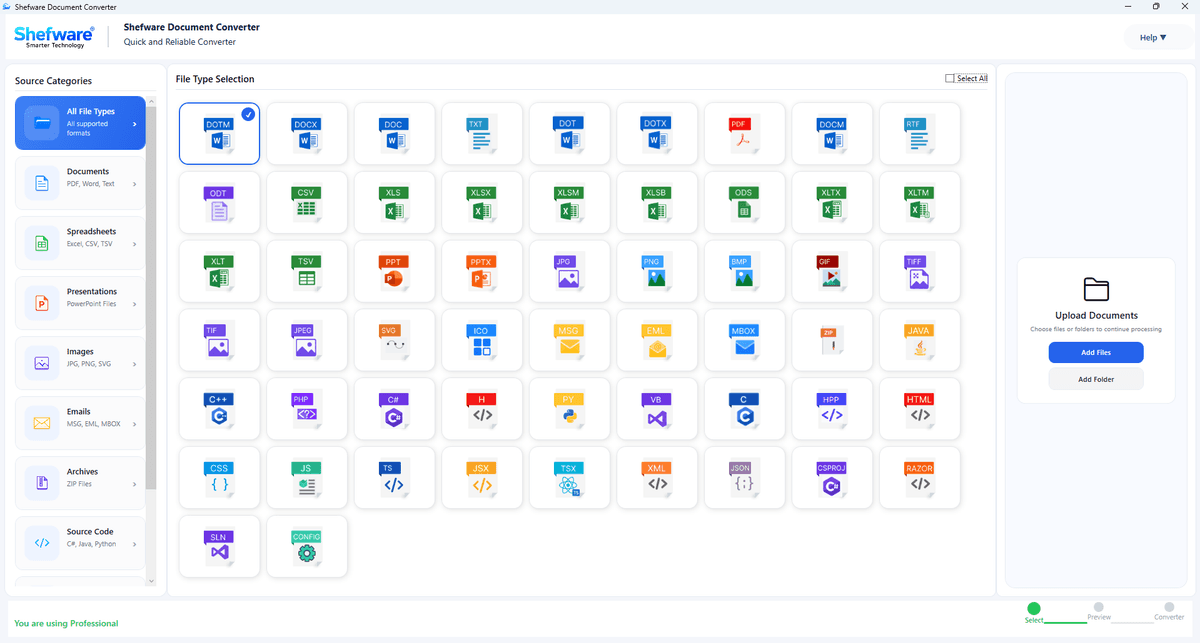
Convert documents into different file formats, such as DOCX, DOCM, DOC, DOT, DOTX, etc.
Track and monitor the detailed status of the conversion process of each job run.
Preview all the items, including the text, hyperlinks, and page layout, in multiple documents before conversion.
Navigate the software using the simple and easy interface. Users can literally rename the files or add date stamping before the conversion process.
Convert the password-protected documents into multiple file formats. Additionally, users can encrypt their documents with passwords to safeguard their data.
Easily batch convert documents at once, eliminating the need to upload files one by one using the bulk document converter.
The emails can be converted into several formats while preserving and maintaining the original email formatting.
This software has been designed to make the conversion process easier and faster without any server interruption.
We have created the Docx Converter Software, which follows simple and practical steps to convert documents into different formats:
Go to any website and click on download, and install the Document Conversion tool to use it.
Browse the files and upload the same to the dashboard after clicking on Add Files.
View and read the files before the conversion process starts. Enter the destination path to store the converted files.
Choose the destination folder where converted files will be stored.
Click on the conversion process to transform the format of a particular file into another format.
Now, go to the destination folder where the converted files are stored. Open the Document Format and verify if the files are in the original formatting and the data.
Download Free Demo & Check System Requirements
Size: 196.73 MB
Version: 1.0.0.1
Hard Disk
1 GB space required
RAM
Minimum 4 GB RAM (Recommended 8 GB)
Processor
Intel® Core™ 2 Duo CPU E4600 @ 2.40GHz 2.39GHz or above
Operating System - Windows 11, 10, 7(64 bit), Windows Server 2025
Prerequisites - .NET Framework 10
“This Documents Converter Software has honestly been a great find for me. I can transfer the documents into multiple file formats, which helps me keep track of all the documents of the clients.”
Lawyer