Migrate Google Drive to OneDrive Securely and Seamlessly
The Shefware Google Drive to OneDrive Migration is a professional tool to transfer files and folders from Google Drive to Microsoft OneDrive while preserving the original folder hierarchy and data structure. The software performs g drive to OneDrive migration of complete Google Drive data and helps maintain file and folder permissions during the transfer.
★ Supports migration of 25 items per folder, with files up to 20 MB.
Reliable, secure and enterprise-ready migration platform
Migrate Google Drive files and folders directly to Microsoft OneDrive with g drive to OneDrive migration.
Transfer multiple Google Drive user accounts to OneDrive in a single job.
Simplifies the Google Drive to OneDrive transfer while preserving the original folder hierarchy.
Migrate Google Docs, Sheets, Slides, PDFs, images, and documents.
Apply date filters to migrate only the required data.
Schedule migration jobs according to requirements.
Migrate large volumes of Google Drive data without manual downloading.
Retry failed migrations up to three times before identifying them as failed.
Generate detailed migration reports and logs for better status monitoring.
Perform incremental migration to transfer new data.
The Google Drive to OneDrive Migration Tool for Windows supports all versions.
Transfer new data and avoid duplicates to reduce migration time and improve efficiency.
Fully supports all versions of Windows, allowing users to move Google Drive Files to OneDrive on their preferred system.
Perform Google Drive Migration to OneDrive while preserving the original file structure and data integrity without changing the data.
Migrate the data from Google Drive to OneDrive folders easily without any data loss. Perform a smooth Google Drive to OneDrive Transfer without manually downloading and uploading files. The software makes bulk data migration seamless and loss-free.
The best Google Drive to OneDrive migration software makes you choose. This one doesn't.
Transfer files and folders directly from Google Drive to Microsoft OneDrive easily without any data loss. Perform the Google Drive to OneDrive Data Migration without any manual downloading process, ensuring easy large-scale migration.
Perform bulk google migration of multiple Google Drive user accounts to respective OneDrive accounts. Users have to select the source and destination tenants for migration without selecting the individual users separately.
Preserve and retain the existing Google Drive folder and subfolder hierarchy during migration. Data is moved with the original structure intact, ensuring no data loss.
The tool supports incremental migration to migrate newly added Google Drive data after the first migration. Skip duplicate items to reduce data migration repetition.
Create the migration jobs and schedule the migration based on the organizational requirements. Users can plan migration for a suitable date and time instead of choosing immediate migration.
Test and evaluate the software by migrating 25 items per folder, with support for files up to 20 MB each.
Select the OneDrive destination folder to store the migrated data while maintaining the original folder structure and organization.
Go to migration history and track the items that were not migrated successfully. The dashboard lists all the failed items and folders and enables users to retry the migration process.
Watch our step-by-step video tutorial to understand how the software works and get started quickly.

When a company switches from Google Workspace to Microsoft 365, employees need to move Google Drive Files to OneDrive while keeping the data organized.

If one company uses Google Workspace and another company uses Microsoft 365, Google Drive data is migrated to OneDrive during the company merger or acquisition.

The Google Drive to OneDrive Migration tool can be used to transfer Google Drive Files to OneDrive in bulk without any manual downloading and uploading.

When new employees use Google Drive at their previous company, the existing files are migrated to OneDrive. Similarly, when an employee leaves the company, the company performs a Google Drive to OneDrive Migration for better access.
Evaluate and experience the free trial version of the software before purchasing the software. The free trial version allows users to migrate 25 items per folder with files up to 20 MB in size. This enables users to evaluate the migration performance, data transfer process, and folder structure. Upgrade to the full version to migrate multiple Google Drive folders easily.
Download Free Demo & Check System Requirements
Size: 45.00 MB
Version: 1.0.0.1
Hard Disk
10 GB space required
RAM
Minimum 8 GB RAM (Recommended 16 GB)
Processor
Intel® Core™ 2 Duo CPU E4600 @ 2.40GHz 2.39GHz or above
Operating System - Windows 11, 10, 8.1, 8, 7, Vista, XP, 2000, 98, NT and 95 and Windows Server 2022, 2019, 2016, 2012, 2008 R2, 2008, 2003 R2, 2003
Download and install the Shefware Google Drive to OneDrive Migration Tool on your system. Launch the software to migrate Google Drive to OneDrive.
Add the source Google Drive account and the destination OneDrive account, and provide the necessary permissions. Once it is verified, the tool displays the data from Google Drive files and folders.
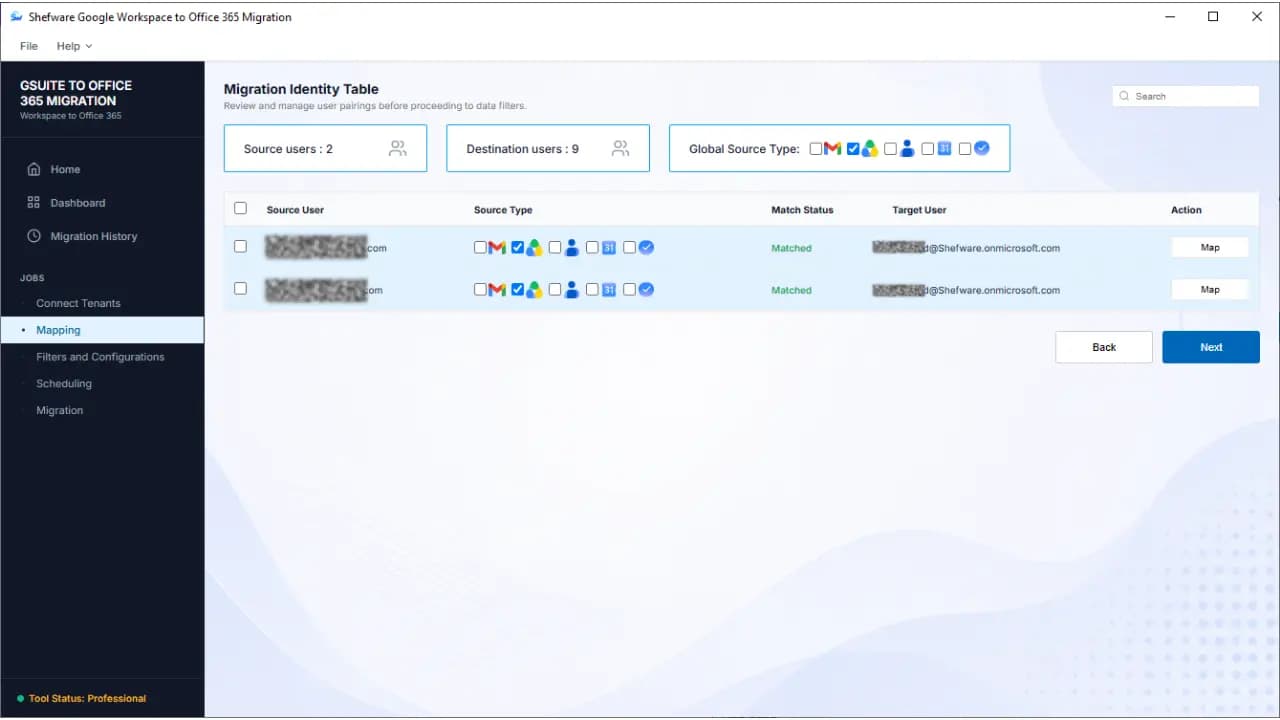
Map the source Google Drive users to the required OneDrive users to ensure the data is migrated to the correct accounts.
Choose the filters, such as date filters, to choose only specific data to migrate Google Drive to OneDrive.
Click Start to begin the migration process immediately or schedule the migration process for a preferred time. Start the migration to move Google Drive Files and Folders to the mapped OneDrive accounts.
The software has helped me migrate multiple Google Drive accounts to OneDrive while preserving the original folder structure. The incremental migration feature has enabled us to migrate only the new data.
Cloud Migration Specialist
The Google Drive to OneDrive Migration Tool is developed to transfer the files and folders from Google Drive to Microsoft OneDrive while preserving the original structure.
Users can migrate the data by connecting the source Google Drive with the destination OneDrive, configuring the settings, selecting the target folder, and starting the migration process immediately or scheduling the migration job.
Yes, the Google Drive to OneDrive Migration software migrates multiple Google Drive accounts to OneDrive accounts in bulk.
Yes, the software ensures preservation of the original folder hierarchy to keep the data organized and easily manageable.
Yes, the software supports the incremental migration feature to transfer new data while skipping previously migrated items to avoid any duplicate item migration.
Yes, you can schedule the migration jobs for a specific date and time instead of starting the migration immediately.
Yes, users can test and evaluate the software’s features and migrate up to 25 items per folder and each file up to 20 MB in size.