Shefware Logo
Offers
Home
Office 365 MigrationImport PST to Office 365Google Workspace to Office 365IMAP to Office 365Email MigrationFile Server to SharepointExchange Online MigrationOneDrive MigrationGoogle Drive to OneDriveSharepoint Migration
View All Products →

Services

Google Workspace to Microsoft 365 MigrationEmail ConversionOffice 365 MigrationTenant to Tenant MigrationCloud BackupTeams Migration

SaaS Platform

NEW
Tenant to Tenant MigrationSharePoint Migration

Solutions

Google Workspace to Microsoft 365 MigrationOffice 365 MigrationIMAP to Office 365Email MigrationOffice 365 BackupIMAP BackupSharePoint BackupOST to PST ConverterPST Password RecoveryVideo Repair ToolVideo Converter
More Products →

Platform

Microsoft 365Amazon Web Services (AWS)Microsoft AzureMicrosoft OutlookMicrosoft Exchange ServerGoogle WorkspaceOneDriveSharePoint OnlineHCL Notes
Marketplace
About UsPartnersCareersReviewsSupportContact Us
+1 888 425 1161
ShefwareSmarter Technology

1316 Wall Street, Everett, WA 98201, USA

support@shefware.com
+1 888 425 1161
  • About Us
  • Careers
  • Contact
  • Privacy Policy
  • Refund Policy
  • Terms to Use
  • EULA
  • Cloud Migration
  • Sharepoint Migration
  • Email Migration
  • Cloud Backup
  • Data Recovery
  • File Conversion
  • Free Tools
  • Partner Program
  • Affiliates
  • Resellers
  • Distributors
  • Partners
  • NFR License
  • Blog
  • Knowledge Base
  • Case Studies
  • How To
  • FAQs
  • News
  • Downloads
DMCA Protected© 2026 Shefware. All rights reserved.

Shefware NSF to PST Converter

Free and Reliable NSF to PST Conversion Solution to Migrate Your Lotus Notes Data

Migrate your Lotus Notes data to Outlook-compatible PST files with Shefware NSF to PST Converter. Convert emails, attachments, contacts, calendars, tasks, notes, and other supported mailbox items. Preserve the available mailbox folder hierarchy and maintain important email properties during conversion.

Free DownloadBuy Now

★ NSF to PST Converter Fully Secured Download Version
NSF to PST Converter
How it Works
Video

Key Highlights of Shefware NSF to PST Converter

Key Highlights Illustration

Convert NSF files into Outlook-compatible PST files.

Migrate emails, attachments, contacts, calendars, tasks, notes, and other supported mailbox items.

Support the Lotus Notes dependency required by the product’s conversion workflow.

Preserve the available mailbox folder hierarchy during conversion.

Process selected folders or mailbox data instead of converting everything unnecessarily.

Preview available NSF mailbox data before exporting it.

Maintain important email properties and available mailbox information during conversion.

Work with multiple NSF files for migration and archival requirements.

Handle large NSF files with an efficient conversion workflow.

Export converted data into supported formats based on your requirements.

Provide a straightforward interface for both technical and non-technical users.

Secure Data Handling

Preview Data Before Export

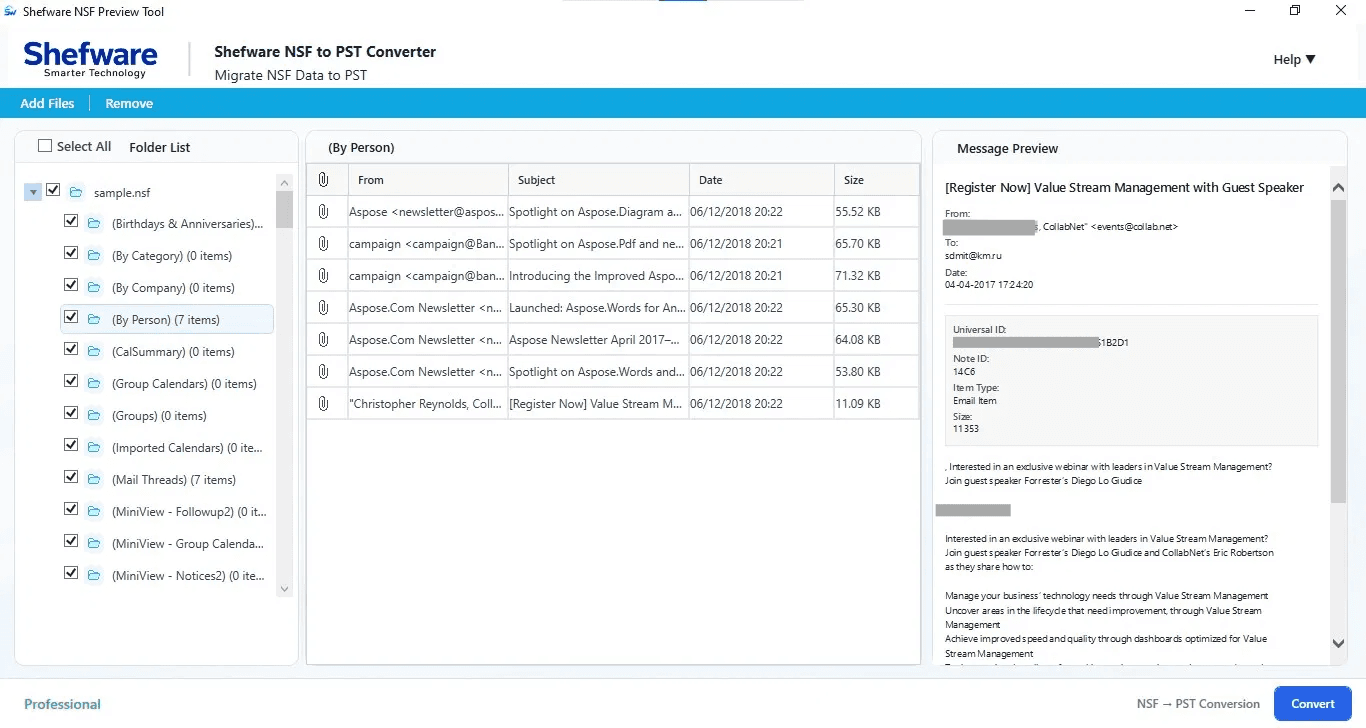
Review available emails, attachments, contacts, calendars, and other supported mailbox items before conversion to identify the data you need.

Control What Gets Converted

Select specific mailbox folders and supported items instead of processing the entire NSF file, helping limit conversion to the data required.

Convert NSF Data Locally

Process NSF files directly on your Windows system without uploading mailbox content to an external online conversion service.

Keep Mailbox Data on Your System

Process mailbox information within your local working environment rather than requiring it to be uploaded to a third-party conversion server.

Prime Features

Convert NSF to PST

Convert accessible Lotus Notes NSF mailbox data into PST files that can be opened and managed through Microsoft Outlook.

Preview NSF Mailbox Data

Review available emails, folders, attachments, contacts, calendars, tasks, and other supported items before conversion.

Selective NSF Conversion

Choose specific folders or mailbox items for conversion instead of processing the entire NSF file.

Preserve Folder Structure

Maintain the available mailbox hierarchy during conversion so emails and other items remain organized in their respective folders.

Convert Multiple NSF Files

Process multiple NSF files to support larger migration, archival, and mailbox consolidation requirements.

Export NSF Data in Multiple Formats

Export supported NSF mailbox data into formats such as PST, EML, MSG, PDF, and other available output formats.

Handle Large NSF Files

Process large NSF files through a structured conversion workflow that makes mailbox migration more manageable.

Maintain Email Information

Retain available email properties, attachments, folder information, and other supported mailbox details during conversion.

Easy-to-Use Interface

Add NSF files, inspect mailbox content, select required data, and begin conversion through a straightforward interface.

Lotus Notes to Outlook Migration

Convert NSF mailbox information into PST format when moving from a Lotus Notes environment to Microsoft Outlook.

Conversion Status and Verification

Monitor conversion progress and verify the exported mailbox data after the operation is completed.

Trusted by Companies Across the Globe

IBMMicrosoftAmazonCisco

How It Works

1

Download & Install NSF to PST Converter

  • Download and install Shefware NSF to PST Converter on your Windows computer.
  • Launch the application after installation to begin the conversion process.
2

Add NSF File

  • Click Add File and select the NSF file from your system.
  • The software loads the selected file and prepares the available mailbox data for processing.
3

Check NSF File

  • Review the selected NSF file and verify its name and location.
  • Examine the available mailbox structure and data after the file loads successfully.
4

Select Mailbox Data

  • Choose the folders or mailbox items you want to convert.
  • Select supported emails, attachments, contacts, calendars, tasks, notes, and other available mailbox data.
5

Select Destination Path

  • Choose the destination folder where you want to save the converted PST file.
  • Ensure the selected location has sufficient storage space for the exported mailbox data.

Technical Specifications

Download Free Demo & Check System Requirements

Software Download
Download Now

Size: 196 MB

Version: 1.0.0.1

System Requirements

Hard Disk

1 GB space required

RAM

Minimum 4 GB RAM (Recommended 8 GB)

Processor

Intel® Core™ 2 Duo CPU E4600 @ 2.40GHz 2.39GHz or above

Operating System - Windows 11, 10, 7(64 bit), Windows Server 2025

Prerequisites - .NET Framework 10

Software Guides
How to WorkInstallationUninstallationEULA

What Our Clients Say

View Reviews

Shefware made our NSF to PST migration much easier than expected. The conversion process was straightforward, and we could work through our mailbox data without unnecessary complexity.

Ava Richardson

IT Operations Manager

Frequently Asked Questions

Q1) What is the Shefware NSF to PST converter?+
Shefware NSF to PST Converter is a Windows-based software tool designed to convert accessible Lotus Notes NSF mailbox data into PST format for use with Microsoft Outlook. It can work with supported emails, attachments, contacts, calendars, tasks, notes, folders, and other mailbox items.
Q2) Can I convert NSF to PST without Lotus Notes?+
Yes. Shefware is designed to convert accessible NSF files without requiring users to manually export each mailbox item through Lotus Notes. The exact requirements may depend on the NSF file and the supported product environment.
Q3) Can I convert NSF to PST without Outlook?+
Yes. The conversion process can create the PST file without requiring Outlook to be actively used during the conversion. Microsoft Outlook can then be used to open and manage the resulting PST.
Q4) What types of data can I convert from NSF to PST?+
Depending on the NSF file, supported mailbox data can include emails, attachments, contacts, calendars, tasks, notes, mailbox folders, and other supported NSF items.
Q5) Can I select specific NSF folders for conversion?+
Yes. Selective conversion allows you to work with the required mailbox folders or data instead of unnecessarily converting the entire NSF file, where supported by the software.
Q6) Does Shefware preserve the NSF folder structure?+
The software is designed to retain the available mailbox organization during conversion so that the resulting PST remains easier to navigate in Outlook.
Q7) Can I convert multiple NSF files?+
Yes, the software can be used for multiple NSF files, making it suitable for migration, archival, and mailbox consolidation scenarios. The exact batch-processing capability depends on the product version.
Q8) Can I preview NSF data before converting it?+
Yes. You can inspect available mailbox information before starting the export, helping you identify the folders and items that need to be converted.
Q9) Can I convert NSF data into formats other than PST?+
Yes. Shefware supports multiple output formats in addition to PST. Available formats may include EML, MSG, PDF, DOC and other supported formats.
Q10) Does the software support large NSF files?+
Shefware is designed to work with large NSF files and provides a structured conversion process for handling larger mailbox datasets. Actual processing time depends on factors such as file size, mailbox complexity, available system resources, and data condition.
Q11) Is my NSF data safe during conversion?+
Shefware processes the NSF file locally rather than requiring the mailbox data to be uploaded to an external online conversion service. This helps keep your mailbox information within your own system during the conversion process.
Q12) Can I convert an orphaned or inaccessible NSF file?+
If the NSF file is accessible and contains readable mailbox data, Shefware can process the available information. The result depends on the condition of the NSF file and the data that can be successfully read.
Q13) Does the converted PST contain duplicate data?+
Shefware is designed to convert the selected NSF data without intentionally creating unnecessary duplicate copies. The final result can also be reviewed in Outlook after conversion.
Q14) Which Windows versions are supported?+
Shefware NSF to PST Converter supports compatible Windows environments specified in the product's technical specifications. Refer to the Technical Specifications section for the currently supported Windows versions.
Q15) Is Lotus Notes required to use the converter?+
The software is designed to work with NSF files directly, reducing the need for a manual Lotus Notes-based export workflow. Specific NSF types and environments may have additional compatibility requirements.
Q16) Can I use the tool for Lotus Notes to Outlook migration?+
Yes. Converting NSF files to PST is useful when organizations are moving mailbox data from Lotus Notes to Microsoft Outlook. The PST output can then be imported or opened in a supported Outlook environment.