Free OST Viewer to Open and Read OST Files
Open and explore Outlook OST files with the free OST viewer from Shefware. The OST file viewer provides access to mailbox data such as emails, attachments, contacts, calendars, tasks, notes, and other Outlook items without depending on an active mailbox connection.
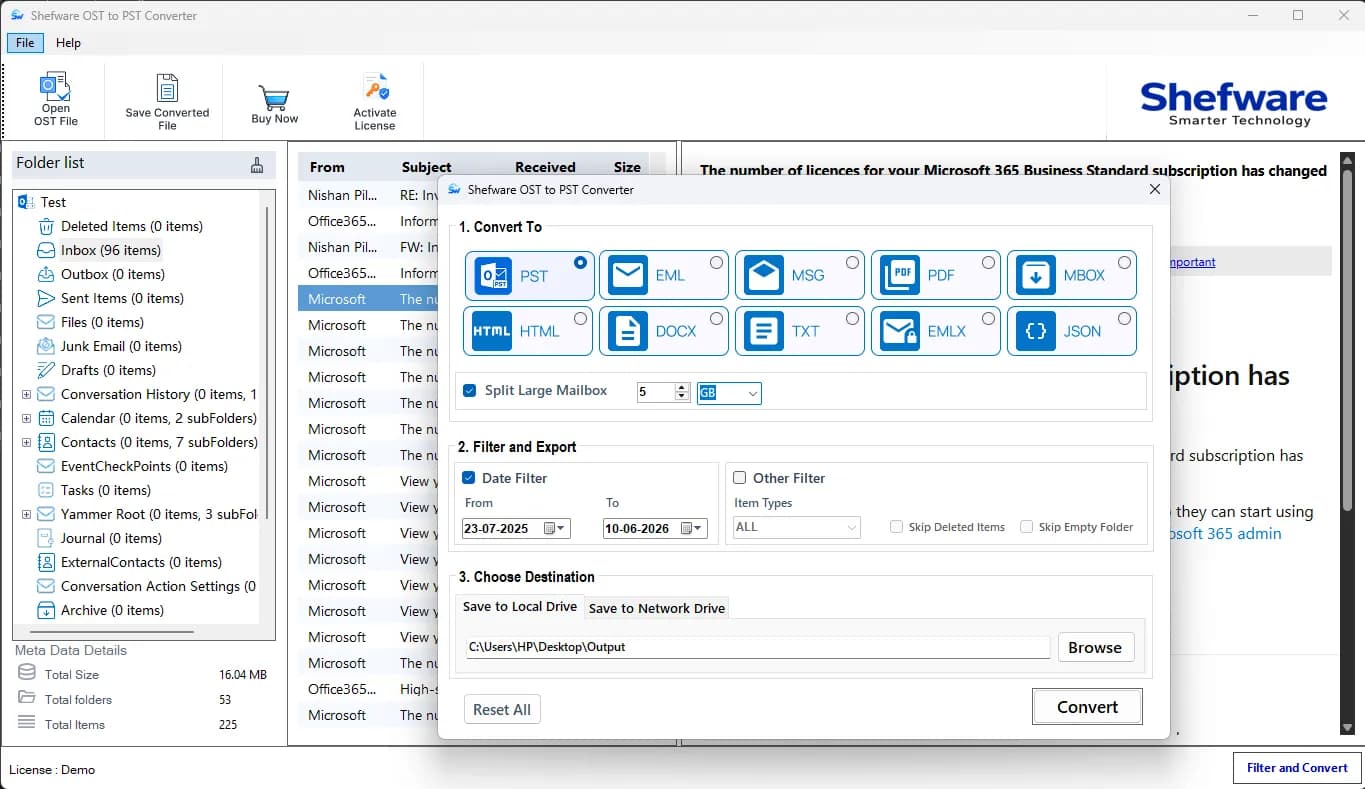
With the free Shefware OST Viewer, users can easily view OST files. After upgrade to full version, users can convert OST files into 9 different formats, including PST. Those formats are mentioned below:



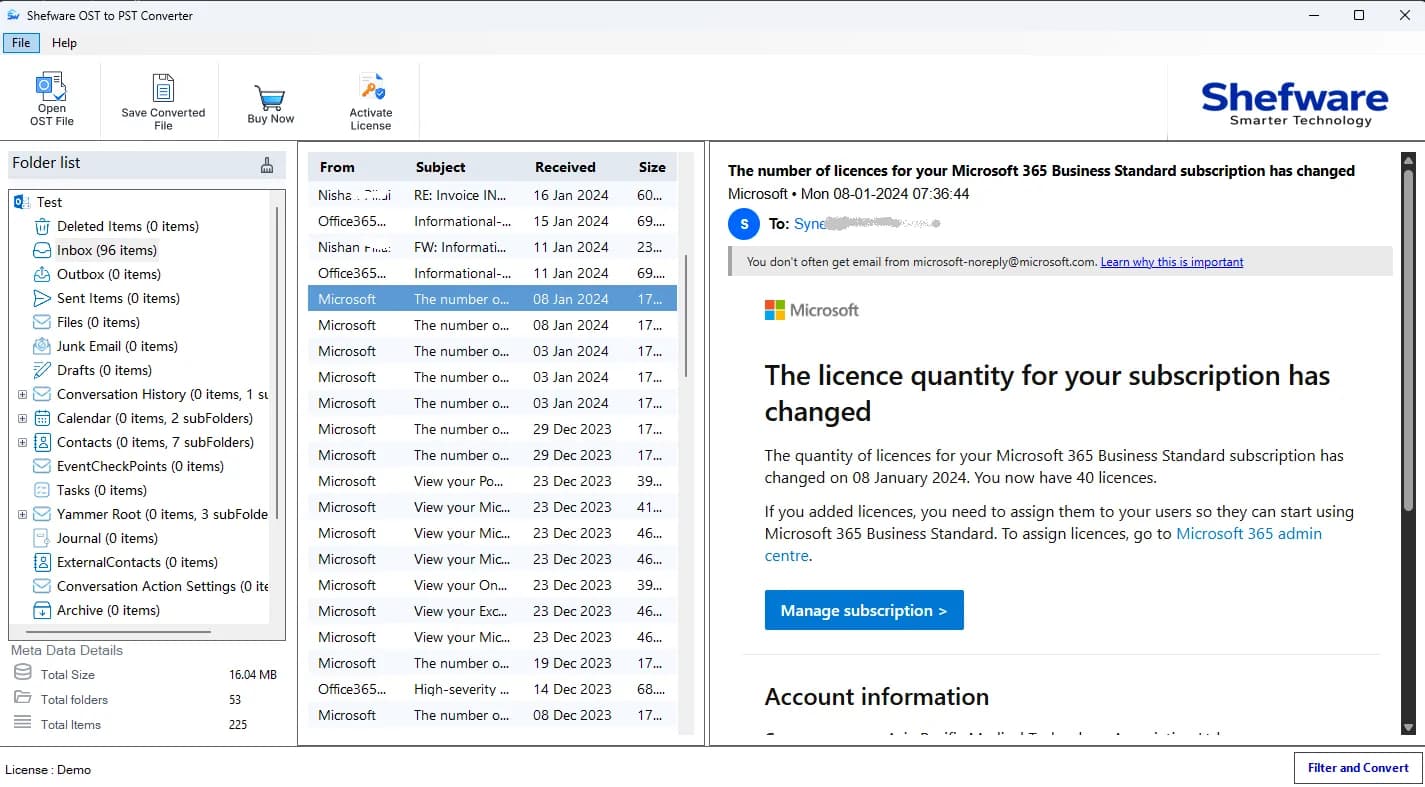
Shefware OST Viewer is designed to let you inspect mailbox information locally while keeping the viewing experience simple, reliable, and fully secure.
Open and examine emails, contacts, calendars, attachments, and other OST items directly from your system without uploading the mailbox to an external service.
Browse the mailbox using its available folders and subfolders, making it easier to locate and review specific OST data without changing its existing organization.
If an OST file is no longer connected to its original Outlook profile, you can open the file and examine the mailbox information that remains accessible.
The viewer works with the OST file on your local computer, helping keep your mailbox information within your own system instead of sending it to a third-party server.
View and explore different types of mailbox information stored in an OST file, including emails, attachments, contacts, calendars, tasks, notes, and other supported Outlook data.
Read emails and inspect attachments, contacts, calendars, tasks, notes, and other mailbox items stored within the OST file.
Navigate through available folders and subfolders to locate specific mailbox information without going through a complicated process.
Add and examine multiple OST files when you need to inspect mailbox data from different files on the same system.
View the contents of an OST file without requiring access to the original Exchange Server or Microsoft 365 mailbox connection.
Access various types of Outlook data, including emails, attachments, contacts, calendars, tasks, notes, and other supported mailbox items.
Load OST files efficiently and navigate through available mailbox content without unnecessary steps.
Use a straightforward interface designed to make opening, reading, and exploring OST files easier for both technical and non-technical users.
CC
BCC
From
Date
Subject
Signature, etc
Documents: PDFs, TXT, DOCS, PPT, etc
Image File Format: JPG, PNG, BMP, TIFF, etc
Multimedia Files: Audio & Video Files
Archive Files: ZIP, RAR, 7Z, TAR
Inbox
Draft
Sent Items
Outbox
Deleted Items
Spam Email
Name
Contact Number
Location
Meetings
Appointments
Recurring Events
Reminders/Notifications
Subject
Category
Due Date
Start Date
Task Status
Collaborated with more than 15,000 enterprises for accessing and viewing OST mailbox data securely.
The Shefware OST Viewer follows a structured process to open and view OST files with accuracy and efficiency:
Download the free OST viewer software and install it.
Open the OST viewer once the installation is finished.
Click on Add File and click Open to proceed.
The file is uploaded and prepared for scanning and viewing.
Verify that the selected OST file is correct and check the file name and location.
Ensure that the OST file contains the required mailbox data.
Select the mailbox folders or items you want to view.
Choose emails, contacts, calendars, tasks, notes, attachments, or other available mailbox data.
View the available emails, contacts, calendars, attachments, and other mailbox data directly in the software.
Select the Target path and click the Export button to start the conversion process if needed.
Once the process is completed, the selected OST data is ready to view and explore.
Verify emails, contacts, calendars, attachments, and other mailbox items to ensure the required data is accessible.
Download Free Demo & Check System Requirements
Size: 196 MB
Version: 1.0.0.1
Hard Disk
1 GB space required
RAM
Minimum 4 GB RAM (Recommended 8 GB)
Processor
Intel® Core™ 2 Duo CPU E4600 @ 2.40GHz 2.39GHz or above
Operating System - Windows 11, 10, 7(64 bit), Windows Server 2025
Prerequisites - .NET Framework 10
Shefware OST Viewer tool performed flawlessly, offering a smooth, efficient, and high-speed viewing experience.
IT Operations Manager
Shefware OST Viewer is a free tool that allows users to open, read, and explore Outlook OST files without requiring an active Exchange or Microsoft 365 mailbox connection.
Yes, the Shefware OST Viewer does not require Microsoft Outlook to be installed. It works independently on any Windows system.
Users can use the Shefware OST Viewer to easily convert OST files into multiple formats, such as PST, PDF, EML, MSG, and more.
Yes, the tool ensures that users can handle large OST file sizes and browse mailbox data without file size limitations.Using inbuilt Split PST feature.
Yes. We take appropriate measures to keep your data protected. The viewer works locally on your computer and your files are never sent to a third-party server.
Users can download the offline Shefware OST Viewer tool to view OST files without internet access.
Yes, users can open orphaned OST files that are no longer connected to an Outlook profile and examine the mailbox information that remains accessible.
Yes, the OST Viewer tool is designed to be compatible with all Outlook versions, such as Outlook 2021, 2019, 2016, and previous versions.
The tool allows you to view emails, contacts, calendars, tasks, notes, attachments, and other mailbox items stored in the OST file.
No, the Shefware OST Viewer is a read-only tool. It does not modify or duplicate the original OST file data.