Shefware Logo
Home
Office 365 MigrationImport PST to Office 365Exchange Online MigrationOneDrive MigrationEmail MigratorIMAP to Office 365
View All Products →

Services

Google Workspace to Microsoft 365 MigrationEmail ConversionOffice 365 MigrationTenant to Tenant MigrationCloud BackupTeams Migration

Solutions

Office 365 MigrationEmail MigrationOffice 365 BackupIMAP BackupIMAP to Office 365SharePoint BackupEmail ConversionOST to PST ConverterPST SplitPST Password Recovery
More Products →

Platform

Microsoft 365Amazon Web Services (AWS)Microsoft AzureMicrosoft OutlookMicrosoft Exchange ServerGoogle WorkspaceSharePointHCL Notes
Marketplace
About UsCareersReviewsSupportContact Us
+1 888 425 1161
ShefwareSmarter Technology

1316 Wall Street, Everett, WA 98201, USA

support@shefware.com
+1 888 425 1161

About

  • About Us
  • Careers
  • Privacy Policy
  • Refund Policy
  • Terms to Use
  • EULA

Solutions

  • Cloud Migration
  • Email Migration
  • Cloud Backup
  • Data Recovery
  • File Conversion
  • Free Tools

Partner

  • Partner Program
  • Affiliates
  • Resellers
  • Distributors

Resources

  • Blog
  • Knowledge Base
  • Case Studies
  • How To
  • FAQs
  • Downloads
DMCA Protected© 2026 Shefware. All rights reserved.

Shefware PST Split Tool

Split Large PST Files into Smaller Parts Easily

Split large PST files securely with Shefware PST Split Tool. Divide PST files by size, date, folder, and email for better Outlook data management.
Free Download
PST Splitter
How it Works
Video

Key Highlights of the Shefware PST File Splitter Software

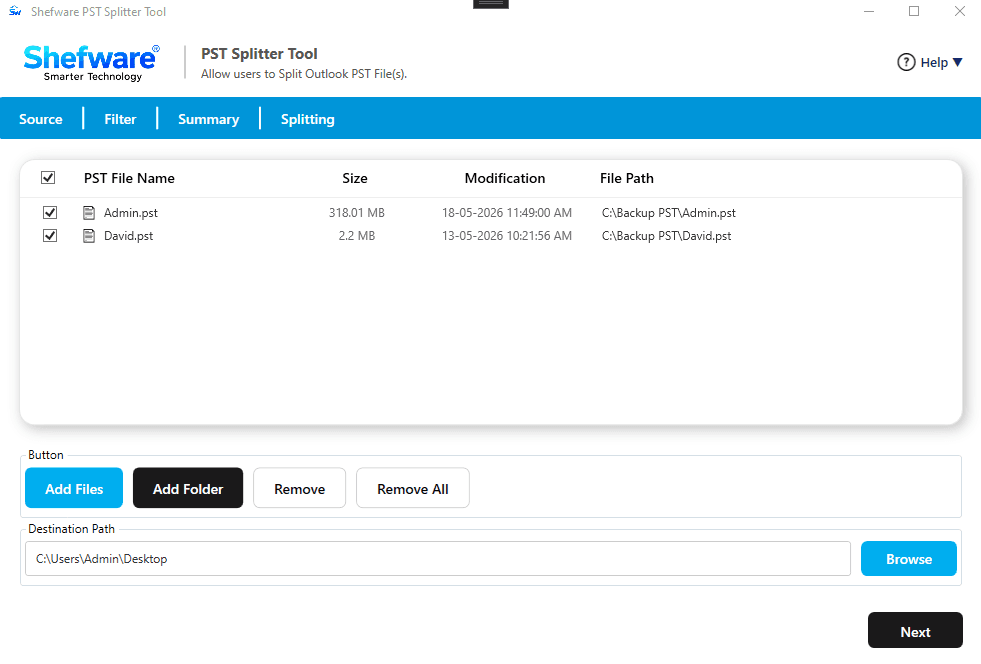
PST Split Tool Dashboard
Easily split PST file by Size, Date, Mail ID, Subject, Year, Sender, folder, and Category.
Split one or multiple PST Files using the PST File Splitter Software.
Critical Data Protection by using the advanced Password Encryption.
Preserves and manages original email hierarchy and metadata.
Supports compatibility in all versions of Windows operating systems for smoother workflow.
Divide the PST file into multiple files regardless of the file size.
Enables users to either create a separate PST file for each selected folder or create a single PST file for selected folder.
Provides the real-time status of the splitting process with details including PST name, item count, and status.
Allows users to either skip deleted items and junk folder
Provides the trial version of the tool for users by offering 20 items per folder.
Split a large PST file into smaller parts and fix slow Outlook Performance.
Split the PST file by year or date to get access to a particular PST File.
Supports operation on Unicode and ANSI PST regardless of any Outlook versions.

Case Scenarios of PST Splitter Tool

PST Splitter software can be used in various situations to simplify Outlook data management, improve performance, and ensure secure email handling

Email Archiving & Organization

Organize and manage Outlook data efficiently by splitting PST files based on date, sender, receiver, size, and other criteria.

Data Migration

Seamlessly migrate smaller PST files between Outlook accounts and systems for easier access and hassle-free transfers.

Backup Management

Create manageable PST backups that consume less storage space and improve Microsoft Outlook performance.

IT Administration

Split large PST files into smaller parts to securely store employee mailbox data and simplify enterprise email management.

End-to-End Secure & Protected

We ensure that the PST Split Tool maintains the data integrity of the users by featuring

Password Encryption

Protect the files by using the password encryption feature and control access to the files.

No Data Transfer Required

Files and folders remain stored in the system, eliminating the need for manual transfer and reducing the risk of sensitive data transfer.

Reduces Data Corruption Risks

The PST Splitter File Software divides the large file into smaller ones to eliminate data corruption risks.

Verified Authority

Verified and validated by various certifying bodies, ensuring user data safety and integrity.

Supported PST File Data

Preserve every important Outlook item while splitting PST files.

Emails

  • Received Emails
  • Sent Emails
  • Draft Emails
  • Junk Folders
  • Hyperlinks
  • Attachments

Email Headers

  • From
  • To
  • Date
  • Subject

Calendars

  • Events
  • Meetings
  • Locations

Contacts

  • Full Name
  • Phone Numbers
  • Primary Email Address

Primary Features & Key Capabilities

We provide the users with various kinds of features that make the PST Splitter Software stand out

Split Outlook Archive PSTs

Enables the users to split of an Outlook archive into multiple PST file(s). Additionally, the tool also provides users with different filters to store the data better.

No Outlook Installation Required

Allows users to split PST without Outlook installation, seamlessly, regardless of the format or size.

Filters Provided

Users are provided with filters such as Date, Year, Size, Mail ID, Folder, Sender, Subject, and Category to search and split a specific PST File.

Password Encrypted

Split the large password-protected PST Files into smaller ones. Additionally, use the feature of Password encryption to protect PST files and restrict unauthorized access.

Backup & Archive Data

Restore the files and folders by creating a complete backup of all the data and saving it securely to any desired location.

Quick & Efficient Splitting

Provides fast and efficient file splitting through a fully streamlined and optimized process.

Windows Compatability

Supports Compatability will all versions of Windows operating systems, making it widely suitable for all platforms.

Free Trial Available

We offer users a demo version for the users to test and evaluate the features, with a limit of 20 items per folder of each PST file.

Shefware PST Splitter Tool Video Guide

Watch our step-by-step video tutorial to understand how the software works and get started quickly.

Shefware PST Splitter Tool Video Guide Video Thumbnail
Watch on YouTube

Effortless & Optimized Workflow

Here’s how the PST Splitter tool works efficiently by following simple and structured steps
How Merge PST Works
1

Import PST Files & Select Destination Path

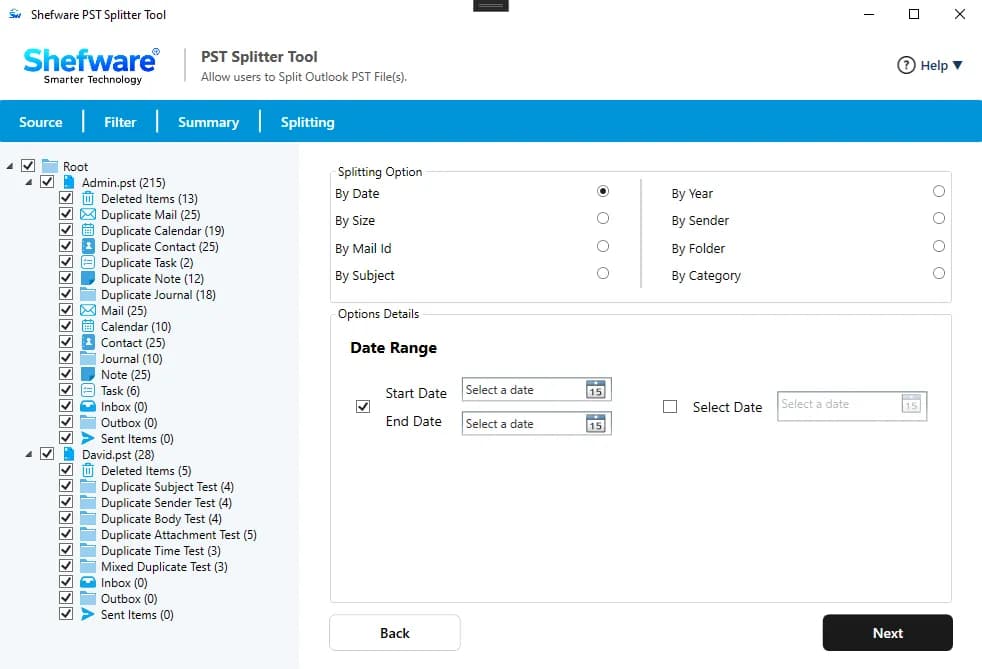
  • Open the software and click on "Add files" or "Add Folder" to import one or multiple files/folders.
  • Select the Destination Folder where the PST File after splitting is stored and click on Next.
2

Choose Filters

  • Select the splitting option filter that the users will use to split the PST Files.
  • Users can choose the splitting options filters out By Date, By Year, By Size, By Mail ID, By Folder, By Sender, By Subject, By Category.
3

Process Completion & Verification

  • Click on Split to start the splitting process of the PST Files.
  • Users can track the status of the process and check their Split PST file on the destination path to confirm whether the file or folder has been successfully saved.

Technical Specifications

Download Free Demo & Check System Requirements

Software Download
Download Now

Size: 72.73 MB

Version: 1.0.0.1

System Requirements

Hard Disk

500 MB space required

RAM

Minimum 4 GB RAM (Recommended 8 GB)

Processor

Intel(R) Core(TM) i3-4160 CPU @ 3.60GHz or above

Operating System - Windows 11 / 10 / 8.1 / 8 / 7 (32 & 64 Bit) , Window Server 2025 / 2022 / 2019 / 2016 / 2012 R2 / 2008 R2

Microsoft Outlook - 2021, 2019, 2016, 2013, 2010, 2007, 2003, 2000 (32-Bit & 64-Bit)

Software Guides
How to WorkInstallationUninstallationEULA

What Our Clients Say

View Reviews

The PST Splitter Tool has saved us a lot of time by adding its value in our organization. We have resolved our corrupted files by dividing all the folders into smaller ones. Honestly, it was the best purchase we made.

Emma Johnson

IT Consultant

Frequently Asked Questions

  • Download and install the software PST Splitter File.
  • Import the Files/Folders.
  • Select Destination Path, apply the filters.
  • Enter the password and re-enter it to confirm it.
  • Click on Next to start the Splitting process.
  • Track the status of the process and verify the data in the location path.
  • Download and install the Shefware PST Splitter Software.
  • Import Files/Folder
  • Select Filter on Files and select a Mail ID, and choose from From, To, CC, and BCC
  • Select the folder type between creating a PST file for each selected folder or creating a single PST file, and then click on Next
  • Select between items such as Mails, Calendars, Contacts, etc. Include/Exclude the deleted items and Junk Folders, and then click on Next
  • Enter the password and verify the PST files in the destination folder after completion.

Yes, Shefware ensures that the PST files are split safely and securely, maintaining the folder hierarchy without any data loss.

The PST Splitter Tool provides different filters such as Date, Year, Mail ID, Folder, Sender, Subject, and Category.

Users can reach out to the team at support@osttopst.us to raise any queries.

The PST File Splitter tool can split PST files regardless of size into multiple smaller files. Users can easily split their PST files between the range of 50 MB and 1 TB.

Yes, we have developed the software with password encryption. It will enable users to protect their files and split them safely.

The PST Splitter Tool preserves and maintains the original folder hierarchy, email metadata properties, attachments, etc.

Yes, the PST Splitter Tool enables users to split one or multiple PST Files at the same time, which ensures workflow efficiency.

No, there is no need to install Outlook to use the PST Splitter software to perform the splitting process.