PST Merge Tool to Combine PST Files Quickly and Securely
Merge PST files securely with Shefware PST Merge Tool. Combine multiple PST files while maintaining emails, contacts, and folder structure.
Merge Outlook mailbox data, including Emails, Calendars, Contacts, Tasks, Journals, and Notes.
Merge PST files into a single file without any data loss.
Supports both Merge and Join modes.
Preserves the original folder hierarchy throughout the merging process.
Free demo version allows merging up to 20 items per folder.
Merge Outlook Archive PST files with ease.
Helps users to remove duplicate items during the PST merge process.
Compatible with all Microsoft Outlook versions from 2007 to 2021.
Simple and user-friendly interface for quick PST merging.
Maintains the integrity and structure of mailbox data after merging.
PST Join tool ensures that the security of the merging process is maintained as follows
The PST files, when they are merged, are safely saved and stored, where there is minimal data transfer to other devices, ensuring data integrity.
PST file merger tool is verified by multiple security authorities, which ensures that we are verified to provide an authentic and protected Merge PST Software.
Merge PST Tool ensures that users can apply password protection to merged PST files, ensuring secure access and data confidentiality.
We eliminate any kind of spam and junk folders from the critical files, reducing the chances of security risks.
Our Merge PST Tool provides advanced functionality, enhanced security, and flexible filtering options for seamless PST file management.
The PST file comes in different formats relying on the Outlook versions. Merge Outlook PST Tool supports old ANSI PSTs and updated Unicode PSTs.
Security is the main issue for users that are using Outlook. Merge PST Tool permits setting a password on the fresh PST file.
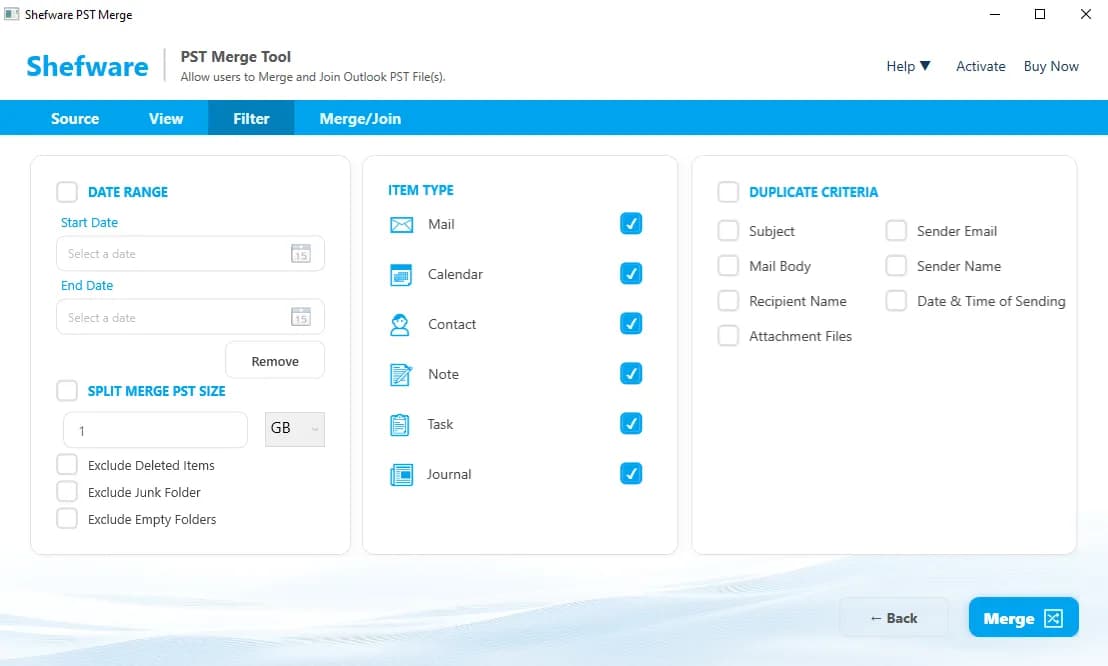
We offer multiple filters in PST Merge Tool, like a date range filter that includes start date and end date, merge pst file size, item type, and duplicate criteria.
Our Merge PST tool provides a quick and user-friendly interface that features
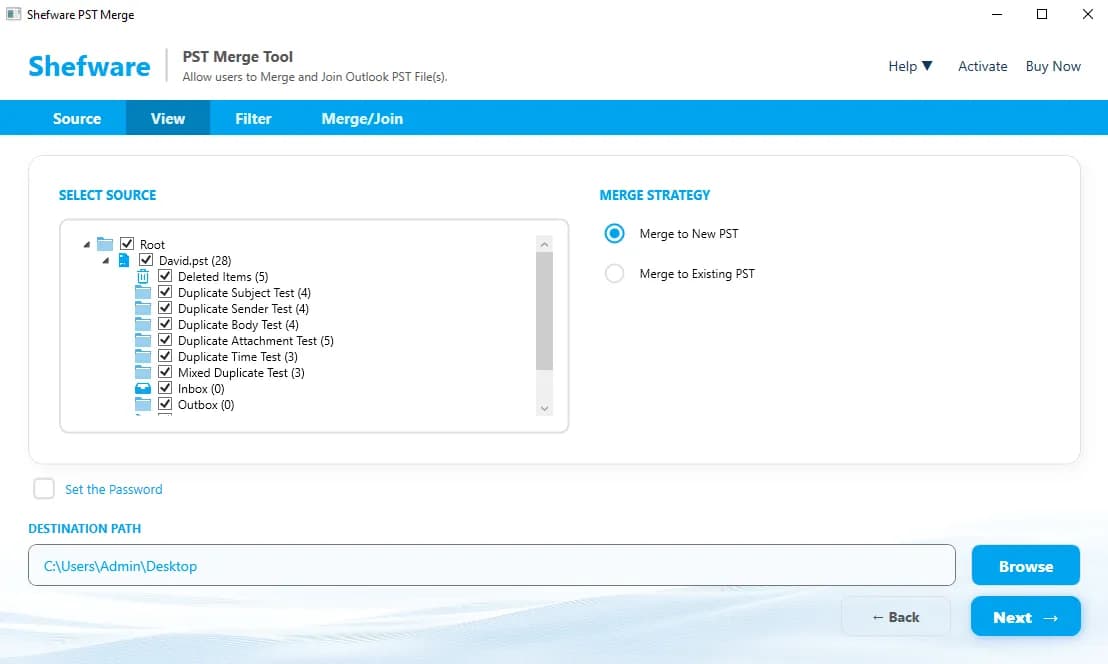
We enable users to merge PST files into an existing PST file or a new File. Outlook Merge Tool enables the merging of two or more Files into one with one set of inbox folders.
Join Split PST files into an existing PST file or create a new PST file. The PST Merger Tool combines the files into organized subfolders while preserving each mailbox's individual Inbox and folder structure.
We ensure that our tool preserves the Outlook email hierarchy and keeps the data organized and manageable.
We merge Outlook mailbox files, including Mails, Calendars, Notes, and Contacts, etc.
We feature the option of selecting specific files among the folders and choosing to include or exclude them from the merging process.
Users can easily combine multiple PST files into one through the merge Outlook PST file tool.
Users are provided with the password to protect the sensitive data from any unauthorized access.
Users have the option to either merge duplicate emails in PST file or eliminate the duplicate files from getting merged.
Our Merge PST Tool securely maintains all Outlook mailbox data while preserving the original structure, metadata, and formatting.
Email Body
Written Content, Attached Images
Headers
To, From, CC, BCC, Subject, Date, Time Sent, and Time Received
Attachments
Documents, Images, PDFs
Read/Unread
Status of read/unread emails
Appointments
Reminders
Attachments
Meeting Reports
Task Subject & Description
Task Status
Priority
Start and Due Dates
Name Fields
Email Address
Contact Details
Address
Notes
Job Information
Personal Credentials
Date of Birth, Anniversary
Entry Type
Subject & Entry Text
Date & Time
Duration
Attachments
Suggested Contacts
Note Body
Color & Category
Creation and Modification Dates
There are a few PST files that can easily be merged into one or more PST files. Some of them include
This permits the generation of an overall new PST file by joining various PST files as well as their folders into one. It makes sure all emails, metadata, and attachments are protected while arranging data into new and one file.
You can easily join or merge various PST files into an existing PST file. The work process runs without any data loss and makes sure the current data is kept the same while including new data.
Watch our step-by-step video tutorial to understand how the software works and get started quickly.
Our Merge PST follows a structured and organized method to execute the Merging Process. They are
First, download and install the best PST Merge tool on your system by visiting our website.
Open the tool, click on " Add files or Add folders, " import the selected PST files, then click on Next.
Choose from Merge to New PST or Merge to Existing PST. Now set a password and destination path, optionally.
Use the filter data like date or item type, such as emails, calendars, and contacts. You can exclude folders and delete duplicates.
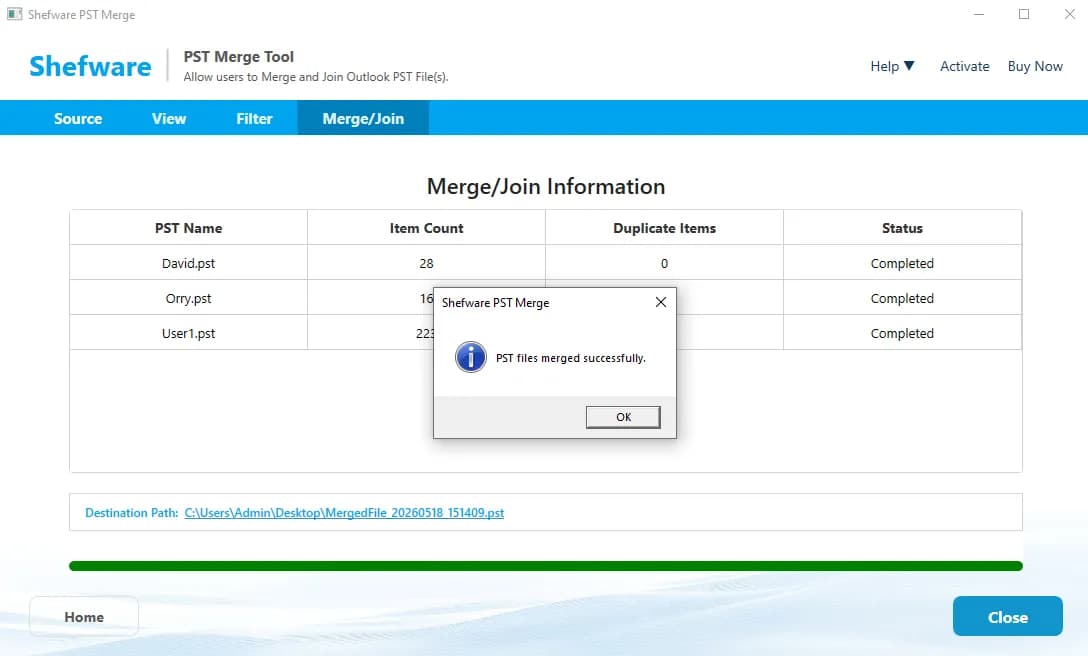
Now click on Merge to start the process, and view the status, such as complete, pending, and failed. Access your merged PST from the selected destination.
Download Free Demo & Check System Requirements
Size: 72.73 MB
Version: 1.0.0.1
Hard Disk
500 MB space required
RAM
Minimum 4 GB RAM (Recommended 8 GB)
Processor
Intel(R) Core(TM) i3-4160 CPU @ 3.60GHz or above
Operating System - Windows 11 / 10 / 8.1 / 8 / 7 (32 & 64 Bit) , Window Server 2025 / 2022 / 2019 / 2016 / 2012 R2 / 2008 R2
Microsoft Outlook - 2021, 2019, 2016, 2013, 2010, 2007, 2003, 2000 (32-Bit & 64-Bit)
The PST Combiner tool has ensured that the multiple PST files are merged effortlessly. It has also been saved by eliminating duplicate files and folders.
Network Engineer
Yes, our tool features the option of merging multiple files into a single folder using our join feature. Users can either save the files in the existing PST or save them in the new ones.
Currently, our tool is compatible with Windows and can execute the entire Merging Process.
Yes, we ensure that user files and folders are safeguarded using the password-encryption feature. Users can choose to apply the password and secure their data.
Yes, Users can easily merge PST files without Outlook with the support of our Merge PST files, which enables one or more merging of PST files.
Yes, Users can easily merge PST files without Outlook with the support of our Merge PST files, which enables one or more merging of PST files.
Our contact details are available on the website to get queries resolved about our products with guidance. You can reach us at abc@gmail.com or call us on 987654321. You may fill out the contact form and enter your query in detail.
Our PST File Splitter Tool can merge multiple files of different sizes without interruption. The tool can combine the PST files between 1 MB and 1 TB
Our tool has been designed to execute the whole merging and joining of PST files quickly and efficiently. However, it also depends on the user's system storage and file size data.
Yes, our tool is developed to combine one or more PST files without actually needing Outlook. Additionally, we also ensure there is no loss of data throughout the merging process.