Outlook Duplicate Remover Tool for Email Cleanup Solutions
Remove duplicate emails, contacts, and Outlook items with a powerful Outlook Duplicate Remover Tool. Clean your mailbox and manage Outlook data quickly and securely.
Understand why duplicate data builds up and how Shefware safely cleans it up.
Duplicate emails can gather after imports, syncing, increasing mailbox size, and slow Outlook. The tool removes repeated emails when saving the original messages, attachments, and metadata.
Outlook duplicate contacts make contact management complicated and ineffective. The tool finds and removes duplicate contacts while protecting overall contact details and keeping addresses clean.
Duplicate Outlook items consume unnecessary storage and affect mailbox performance. Removing duplicate emails, calendars, notes, and tasks to keep the Outlook mailbox structured and running effectively.
Duplicate email remover deletes duplicates from the Outlook Mailbox without installation.
Identify and remove duplicates only from the selected Outlook folder.
Compare items across folders to delete duplicate entries in the Outlook mailbox.
Choose exactly how duplicate Outlook database entries should be processed and managed:
Different kinds of filters available for accurate duplicate removal.
Choose different filter options available for different Outlook item types.
Choose the date filters to select within the specific date range.
Divide the OST and PST Files based on size.
Compare the email attributes and choose the general filters.
Compare the email attributes separately and choose the advanced filters.
The Outlook duplicate email remover finds duplicate email messages using one or multiple of the following properties:
Discover the main features of the tool, developed to simplify mailbox management.
Scans Outlook files to identify duplicate emails, contacts, calendars, tasks, notes, and journals. It removes only duplicate items and protects the mailbox content.
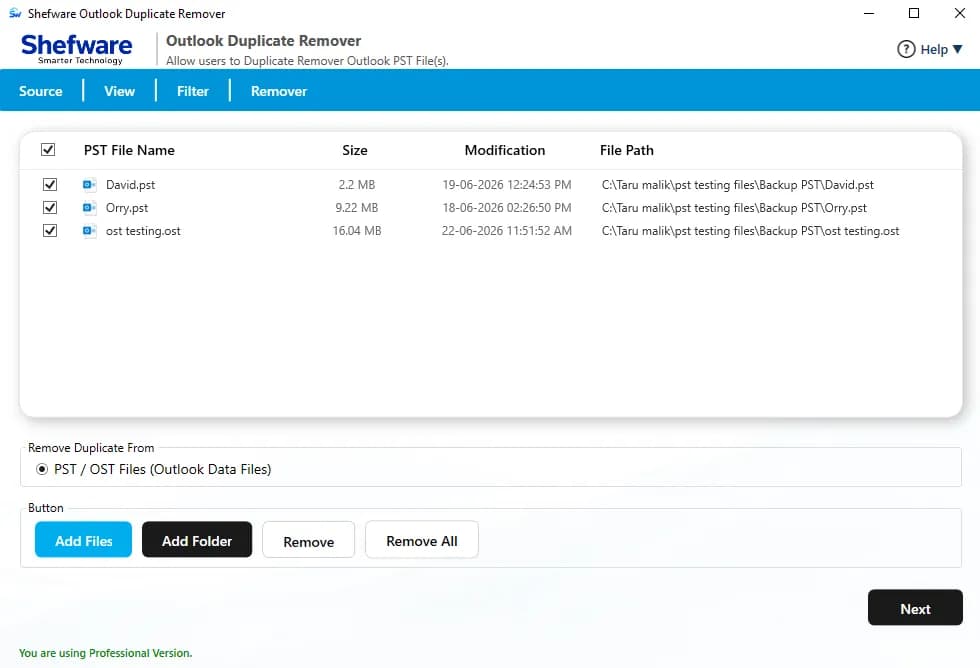
Add one or more Outlook data files or folders. The batch processing ability saves time by cleaning various mailboxes in one function.
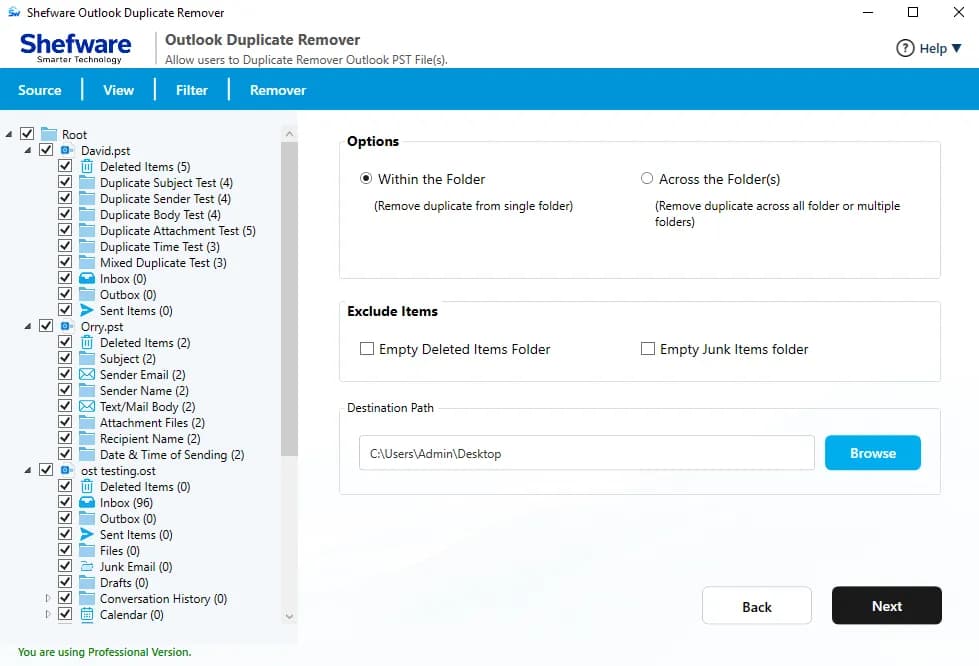
Select how duplicate items can be found within the folder and across the folders. You can easily detect and remove them from the selected folder, and you can compare multiple mailbox items.
Offers multiple actions to remove duplicate emails from Outlook files, such as delete permanently, move to a selected folder, move to the deleted items folder, put a flag, and mark as expired, etc.
Users can select particular Outlook item types like Mail, Contacts, Calendar, Notes, Tasks, and Journals, date range filter, split PST filter, etc. It quickens up the process and removes only duplicate items you want to clean.
Clean duplicate Outlook data within a particular time by applying a date range or selecting predefined time filters. This removes only recent or old duplicate mailbox items.
Once you add the files for data deduplication, it will display the current status, duplicate count, and progress report. It shows the status as complete after the process has finished.
Supports all the versions of Outlook 2021, 2019, 2016, 2013, 2010, 2007, and 2003. You can upload a PST file of any Outlook version to delete duplicates.
Simple and secure step-by-step workflow to remove all duplicate items.
Introduce the tool and use Add Files or Add Folder to import one or multiple files for duplicate removal.
Select the Outlook folders you want to scan and decide whether to remove duplicates within a folder or across multiple folders.
Also, select the options to empty the deleted items folder and the empty junk items folder if needed. Choose the destination path to store the output file.
Select item types like Mail, Contacts, Calendar, Tasks, Notes, and Journal.
Choose filters from General and Advanced, then apply comparison standards, split filters, and date filters if required.
Click Remove to begin the process.
The software shows live progress, duplicate count, and processing status until the process is finished. Once completed, the pop-up message shows process completion. Go to the destination folder where the file is stored.
If you are an individual user, a small business, an enterprise, or a managed service provider, the software efficiently manages Outlook mailboxes of all sizes.
Features an intuitive interface that needs no technical assistance. Add Outlook files, select duplicate detection alternatives, preview, and remove duplicate items in just a few clicks.
Using multiple comparison properties like subject, sender, recipient, attachments, dates, and other elements, the software accurately finds duplicate entries while minimizing incorrect matches.
Only duplicate Outlook items are removed. The software preserves the original folder hierarchy, Email formatting, attachments, and Metadata. Your mailbox remains entirely organized after cleanup.
Download Free Demo & Check System Requirements
Size: 72 MB
Version: 1.0.0.1
Hard Disk
10 GB space required
RAM
Minimum 4 GB RAM
Processor
Intel(R) Core(TM) i3-4160 CPU @ 3.60GHz or above
Operating System - Windows 11 / 10 / 8.1 / 8 / 7 (32 & 64 Bit) , Window Server 2025 / 2022 / 2019 / 2016 / 2012 R2 / 2008 R2
Microsoft Outlook - 2021, 2019, 2016, 2013, 2010, 2007, 2003, 2000 (32-Bit & 64-Bit)
Our company moved some Outlook mailboxes, which resulted in thousands of duplicate emails. Shefware Outlook Duplicate Remover cleared all the duplicate items instantly while keeping the folder structure and attachments the same. It saved a lot of time.
IT Administrator
Find answers to common questions about Shefware Outlook Duplicate Remover.
Step 1: Download and add Outlook Data Files.
Step 2: Choose Folders & Options (within folder or across folders).
Step 3: Apply Filters (Mail type, date range, split filters, matching properties).
Step 4: Click Remove Duplicates to execute the cleanup.
Yes, you can quickly delete duplicates using the Shefware Outlook Duplicate Remover Tool. It provides an 'Add File' and 'Add Folder' option where you can upload multiple PST files or an entire folder of files.
Shefware tool supports all Outlook versions, including Microsoft Outlook 2021, 2019, 2016, 2013, 2010, 2007, and 2003.
The free demo version of the Outlook duplicates remover tool will remove only 20 items per folder. If you want to delete more than 20 items, you have to purchase the license for the tool.
Yes, the Outlook Duplicate Items Remover tool is fully capable of scanning and deduplicating contacts from Outlook.
Yes, the Shefware tool comes with 24x7 customer support and a free trial version for your evaluation before purchase.