Convert Mac Outlook OLM Files to Outlook PST with no data loss.
Transfer Mac Outlook mailbox to Windows Outlook easily using Shefware OLM to PST. It converts OLM files into PST while preserving emails, attachments, contacts, calendars, notes, tasks, journals, and folder hierarchy.
★ Free Download view and export 25 items per folder.
Shefware OLM to PST Converter supports exporting Outlook for Mac OLM files into multiple storage formats.



Enjoy premium performance and secure offline OLM to PST conversion with advanced, enterprise-grade capabilities.
Convert a single OLM file into PST smoothly.
Export emails, contacts, calendars, tasks, notes, attachments, and journals.
Protect folder hierarchy, metadata, and email formats.
Preview mailbox items before the conversion begins.
Assist large-sized OLM files with no size limitation.
Convert selected folders rather than the overall mailbox.
Split PST : The large-sized mailbox (.OLM) file into small multiple manageable PST files.
No installation of Outlook or Mac Outlook is needed to complete the conversion to PST.
Find out when OLM to PST conversion is critical for your data accessibility and migration.
Are you planning to move from macOS to Windows? Convert the overall Mac Outlook for Mac mailbox into PST and access it quickly in MS Outlook for Windows.
Businesses upgrade employee systems and sometimes migrate from Mac devices to Windows environments. Convert multiple OLM mailboxes into PST files for fast execution.
If you have archived OLM files from an old Mac, convert them into PST format and access historical emails, contacts, calendars, and attachments in Windows Outlook.
Download the free demo version of the Shefware OLM to PST and discover its main features before purchasing. Scan OLM files, preview all mailbox items, and convert up to 25 items per folder to PST and convert into multiple formats while maintaining the original mailbox structure.
Advanced feature suite that empowers administrators and users to perform OLM file conversions smoothly.
Scan and preview the complete OLM mailbox before exporting it to PST. See emails, attachments, contacts, calendars, notes, tasks, and journals in a proper tree structure, permitting you to verify mailbox data before starting the conversion.
Avoid converting unimportant data by selecting particular mailbox folders or items. Select the required emails, contacts, calendars, or other Outlook data for a faster OLM to PST conversion.
Beyond PST, we let you export OLM mailbox data into multiple popular file formats like EML, MSG, PDF, MBOX, HTML, and more formats to meet different migration, backup, and archival requirements.
Convert OLM to PST file along with all embedded attachments without changing their structure or content. Documents, images, PDFs, spreadsheets, and other attachments are kept linked to their emails after conversion.
Reduce conversion time by applying smart filters before exporting mailbox data. Filter emails based on date range, item types, skip deleted items, skip empty folders, split large mailboxes, or other criteria to migrate only the information you need.
Prevent oversized Outlook data files by enabling the built-in PST split option. Create smaller PST files based on the selected size, making them easier to manage, store, and import into Microsoft Outlook.
Need to switch email platforms? Convert Outlook for Mac OLM files directly to MBOX format, allowing you to import your mailbox into Apple Mail and other MBOX-supported email clients.
The converter lets you save the converted file to local and network drives. This provides greater flexibility while organizing converted mailbox data.
Migrates every mailbox component from your Outlook for Mac OLM file to Outlook PST with complete accuracy.
| Mailbox Item | Details |
|---|---|
| Emails | Converts all email messages while preserving sender, recipient, subject, timestamps, formatting, hyperlinks, and attachments. |
| Attachments | Migrates all attached documents, images, PDFs, spreadsheets, presentations, and other file types without modification. |
| Contacts | Converts complete contact information, including names, email addresses, phone numbers, company details, and notes. |
| Calendars | Transfers appointments, recurring meetings, reminders, schedules, and event details with their original properties intact. |
| Tasks | Converts Outlook tasks, including priority, due date, completion status, reminders, and notes. |
| Notes | Exports personal notes while preserving their content and formatting. |
| Journals | Migrates Outlook journal entries without data loss for complete mailbox preservation. |
| Categories | Retains color categories and mailbox labels assigned to emails and other Outlook items wherever supported. |
| Folder Hierarchy | Preserves the original mailbox structure, including folders and subfolders, for easy access after conversion. |
| Email Properties | Maintains Internet headers, read/unread status, importance, flags, CC, BCC, and other message attributes. |
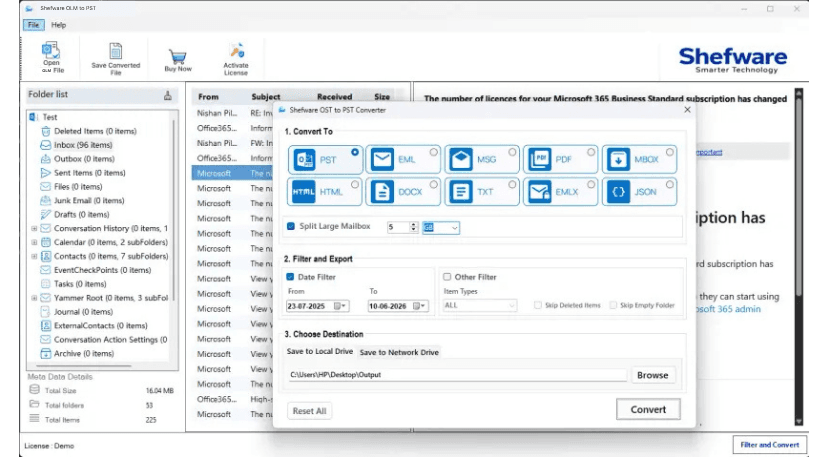
Follow these simple steps to perform an error-free OLM to PST conversion in minutes.
Download and install the Shefware OLM file to PST on your computer. Open the software and click Open File or Folder to upload the OLM file.
The software scans the selected OLM file and displays the complete mailbox structure in a tree view. Preview emails, contacts, calendars, notes, tasks, journals, and attachments before starting the conversion.
Choose the folders you want to export or select the entire mailbox. Apply filters such as Date Range, item types, skip deleted items, skip empty folders, or Folder Selection to convert only the required mailbox items.
Select PST as the destination format, then browse to the location where you want to save the converted Outlook PST file to the local drive and network drive.
Watch our step-by-step video tutorial to understand how the software works and get started quickly.
| Features | Free Version | Professional Version |
|---|---|---|
| Convert OLM file to PST | ✓ | ✓ |
| Preview Complete OLM Mailbox | ✓ | ✓ |
| Export Emails, Contacts, Calendars, Tasks & Notes | ✓ | ✓ |
| Maintain Email Formatting & Metadata | ✓ | ✓ |
| Export Email Attachments | ✓ | ✓ |
| Convert to 8+ File Formats | ✓ | ✓ |
| Apply Advanced Filters | ✓ | ✓ |
| Export to Office 365 & Exchange Server | ✓ | ✓ |
| Split Large PST Files | ✓ | ✓ |
| Save to Local & Network Drive | ✓ | ✓ |
| Process Large OLM Files | ✓ | ✓ |
| Number of OLM Files per Conversion | Unlimited | Unlimited |
| Mailbox Items Converted | 25 Items per Folder | Unlimited |
| Technical Support | Limited | 24×7 Priority Support |
| License Validity | Trial | Lifetime License |
Our tool is trusted for its ease of use, absolute safety, and capability to preserve folder structures.
Convert OLM files in simple steps with a user-friendly interface. Add the OLM file, preview the mailbox, select export settings, and complete the conversion without any technical expertise.
The software maintains the original folder hierarchy, email formatting, attachments, metadata, and mailbox properties, making sure the converted PST looks exactly like the source mailbox.
Shefware OLM to PST Converterworks independently without needing Outlook installation. All conversion takes place locally on your system, keeping your mailbox data secure and private.
Download Free Demo & Check System Requirements
Size: 168 MB
Version: 1.0.0.1
Hard Disk
500 MB space required
RAM
Minimum 4 GB RAM (Recommended 8 GB)
Processor
Intel(R) Core(TM) i3-4160 CPU @ 3.60GHz or above
Operating System - Windows 11 / 10 / 8.1 / 8 / 7 (32 & 64 Bit) , Window Server 2025 / 2022 / 2019 / 2016 / 2012 R2 / 2008 R2
Microsoft Outlook - 2021, 2019, 2016, 2013, 2010, 2007, 2003, 2000 (32-Bit & 64-Bit)
We migrated over 200 Outlook for Mac mailboxes to Windows Outlook using Shefware. The batch conversion feature saved us several days of manual work, and every mailbox was converted accurately.
IT Administrator
Find answers to the most common questions related to Shefware OLM to PST Converter.