Convert Excel files to multiple formats with no data loss
Help users convert Excel spreadsheets into multiple file formats while saving data, format, formulas, tables, charts, cell types, and workbook structure. If you need to convert XLS or XLSX files into PDF, CSV, HTML, XPS, TXT, DOC, EPUB, and other formats, then the tool offers quick results.
★ Excel Converter Tool Fully Secured Download Version
Convert Excel files into multiple file formats.
Batch convert XLS and XLSX files in one go.
Protect formulas, tables, formatting, charts, and cell types.
Convert Excel to PDF quickly and easily.
Preview Excel sheets before the conversion begins.
Supports various source formats like CSV, XLS, XLSX, ODS, TSV, and others.
Save converted files to any preferred location.
Supports and converts multiple-language Excel spreadsheets.
The free version supports 5 Excel files with a watermark on every page.
No Microsoft Excel installation required.
Organizations must preserve invoices, financial statements, tax filings, and payroll logs for long-term compliance. Exporting Excel files to standardized PDF or document formats ensures permanent storage and document integrity.
Businesses frequently share financial reports and analytics with clients and executive management. Converting Excel files to PDF preserves original formatting, tables, charts, and page layout while locking content against unauthorized edits.
Not all target applications or web systems support raw Excel workbooks. Converting spreadsheets into universally recognized formats such as CSV, TXT, or HTML maximizes cross-platform compatibility with databases, ERP systems, and web apps.
1 Supported Format
10 Supported Formats
2 Supported Formats
1 Supported Format
1 Supported Format
2 Supported Formats
Saves time by converting multiple Excel files in one go. Add individual files or an entire folder, and the software processes all selected workbooks at the same time while maintaining their original data, formatting, and structure.
Imports various Microsoft Excel file types, including XLS, XLSX, XLSM, XLSB, XLTX, XLTM, XLAM, ODS, CSV, XLT and TSV. It ensures smooth conversion regardless of the spreadsheet format you work with.
Convert Excel spreadsheets into various output formats such as PDF, DOCX, TXT, EPUB, XPS, HTML, JSON, CSV, XLSX, XLS, and other compatible formats. This flexibility makes it easy to share, edit, archive, or publish your spreadsheet data.
Save converted files to any destination folder on your computer. The software allows you to browse and select a preferred location before conversion, making it easier to organize and manage exported files.
Precisely processes Excel files containing multilingual content without affecting characters, symbols, fonts, or spreadsheet formatting. It supports spreadsheets created in various languages.
Monitor every conversion with the help of the Conversion History feature. After the process is complete, review details of previously converted files, including their status, destination, and format, making it easy to track completed tasks.
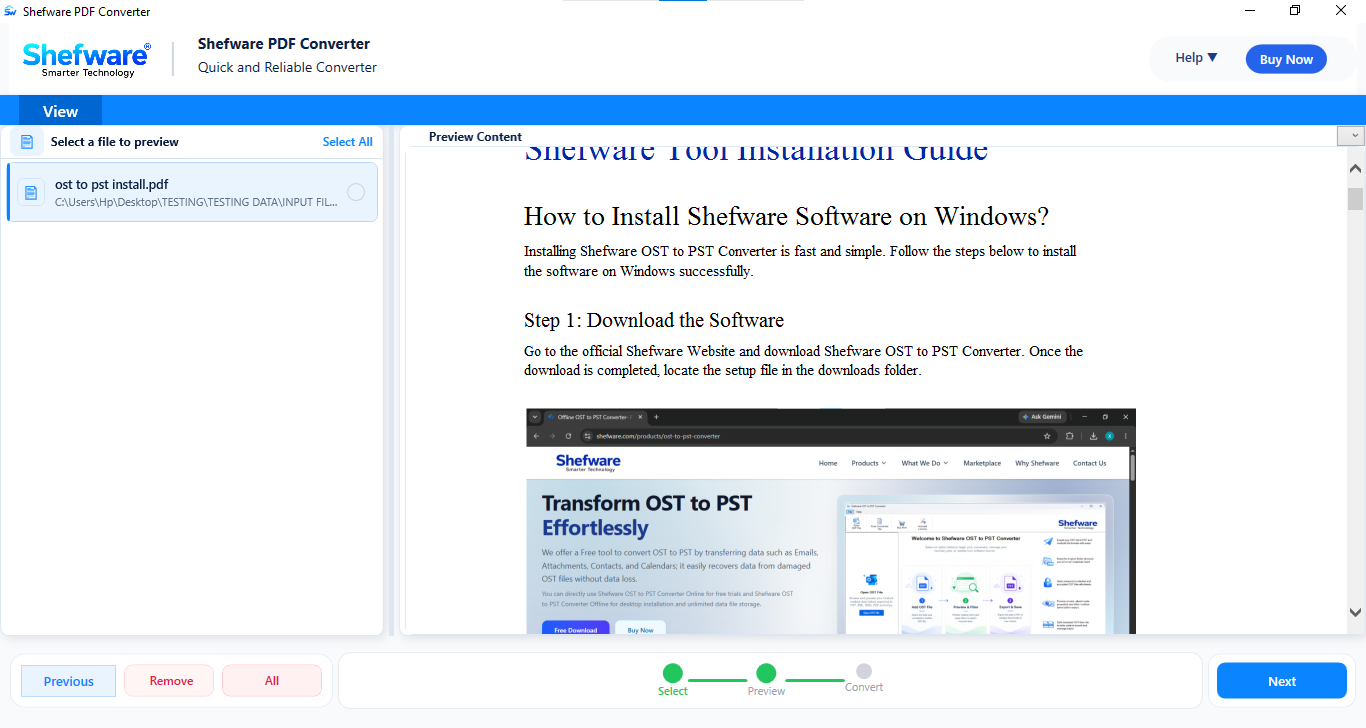
Preview Excel workbooks before starting the document conversion process to ensure you have selected the correct file. The software displays all worksheets along with their rows, columns, tables, and cell data, allowing you to verify the spreadsheet content in advance.
Evaluate the software before purchasing with the free demo version. The free Excel converter edition allows you to convert up to 5 Excel files while adding a watermark to each converted page.
Open the Shefware Excel Converter on your computer. From the Source Categories section, select the required Excel file format, then click Add Files or Add Folder to import one or multiple Excel workbooks.
The software scans the selected Excel files & displays all available worksheets. Preview the spreadsheet data, including rows, columns, tables, and cell values to verify the content before proceeding with the conversion
After reviewing the Excel file, click Next to open the conversion window. Here, you can choose the desired output category and file format according to your requirements.
Choose the destination format such as PDF, Spreadsheet, Document, eBook, Microsoft XPS, or Web & Markup. Then select the specific output format from the available options.
Click the Browse button to select the folder where you want to save the converted files. The selected destination path is displayed before the conversion starts. Then, click Convert.
Once the conversion is finished, a confirmation message appears. You can instantly open the folder to access the converted files or review the Conversion History to view the details.
Features a clean and intuitive interface that simplifies the entire conversion process. Import Excel files, preview worksheets, select the output format, and convert your files in just a few clicks without any technical expertise.
The software performs all conversions locally on your computer without uploading files to any external server. This ensures complete privacy and keeps your confidential spreadsheets secure throughout the conversion process.
Convert Excel files while maintaining the original worksheets, tables, cell formatting, formulas, fonts, charts, and overall workbook structure. The exported files retain their quality and readability.
Shefware Excel Converter runs smoothly on Windows 11, 10, 8.1, 8, and 7. It requires no additional applications or Microsoft Excel installation to convert your spreadsheets.
Download Free Demo & Check System Requirements
Size: 232 MB
Version: 1.0.0.1
Hard Disk
1 GB space required
RAM
Minimum 4 GB RAM (Recommended 8 GB)
Processor
Intel® Core™ 2 Duo CPU E4600 @ 2.40GHz 2.39GHz or above
Operating System - Windows 11, 10, 8.1, 8, 7 (32-bit & 64-bit), Windows Server 2025
Prerequisites - .NET Framework 4.8 or higher
Shefware Excel Converter helped us convert hundreds of Excel reports into PDF without affecting formulas, tables, or formatting. The batch conversion feature significantly reduced our processing time.
Financial Analyst
The excel converter software supports multiple source formats, including XLS, XLSX, XLSM, XLSB, CSV, ODS, XLTX, XLTM, XLT, TSV, and XLAM. These files can be converted into formats such as PDF, DOCX, TXT, EPUB, XPS, HTML, JSON, CSV, and more.