

Services
Google Workspace to Microsoft 365 MigrationEmail ConversionOffice 365 MigrationTenant to Tenant MigrationCloud BackupTeams Migration
Split CSV file into multiple files without losing data integrity.
Manage large CSV files easily with the help of the Shefware CSV Splitter Tool. It helps you split large CSV files into multiple small files based on rows, file size, or custom criteria while maintaining full data integrity.
★ Try Free Demo Version evaluate the CSV split quality and performance.
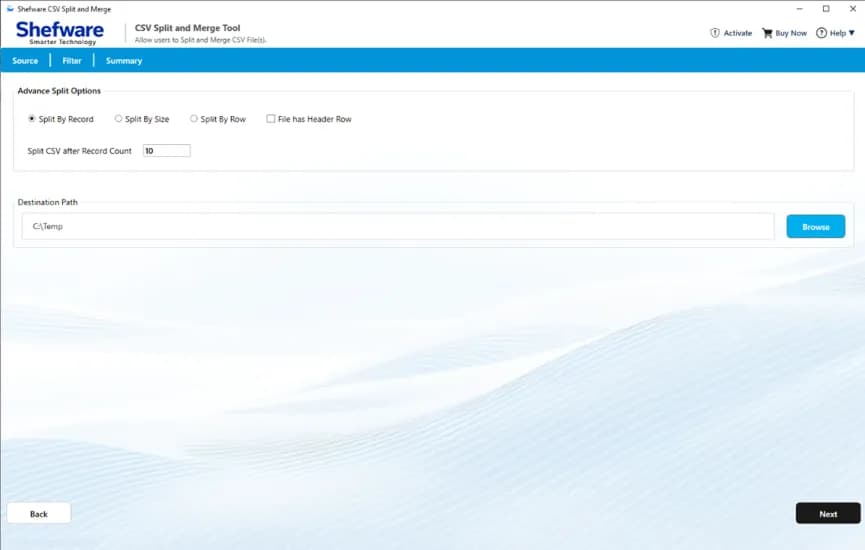
Split large CSV files into multiple small CSV files.
Divide CSV files by record count, size, row count, and whether each file has a header row.
Preview CSV file data before beginning the splitting process.
Maintains original rows, columns, headers, and formatting.
Has dual options Add Files or Add Folders to upload your CSV files.
Assists in batch mode to divide multiple CSV documents.
Supports multiple output file types, including CSV, XLSX, XLS, XML, and ODS.
Split CSV files for multiple platforms like Microsoft Excel, Google Sheets, WPS Office, and others.
Make sure complete data integrity during the process and save the header, data row, and delimiters.
Compatible with all Windows versions.
Split large CSV files based on the desired number of records per file. The tool automatically creates multiple smaller CSV files while preserving the original data structure.
Divide oversized CSV files into smaller files based on the file size you specify. This feature makes sharing, uploading, and storing large CSV files much easier.
Create multiple CSV files by defining the number of rows in each output file. It is ideal for organizing large datasets into manageable parts.
Keep the original column headers in every split CSV file. This ensures each output file remains properly formatted and ready for analysis or import.
Large CSV files often become complex to open, edit, and process in spreadsheet applications. The software divides huge CSV files into smaller files that are easier to manage while preserving every record accurately.
Businesses work daily with customer databases, employee records, invoices, sales reports, and inventory files. Splitting CSV files into smaller datasets enhances organization and simplifies data management.
Many CRM systems, cloud applications, and online platforms limit CSV upload sizes. Split large CSV files into smaller files that meet upload requirements without modifying the original data.
Large CSV files can significantly slow database imports. Breaking one large file into multiple smaller CSV files speeds up importing and reduces processing time.
After splitting the CSV file, export the output in multiple formats, including CSV, XML, ODS, XLSX, and XLS. Choose the format that best suits your workflow for seamless access and compatibility.
Add a single CSV file or an entire folder for quick processing. The software supports both file and folder import options, making it easy to split multiple CSV files in one go while saving time and effort.
Save valuable time by processing multiple CSV files in a single operation. Simply add individual files or an entire folder and let the software split all CSV files automatically without manual intervention.
Verify your CSV file before processing with the built-in preview feature. Review rows, columns, headers, and values to ensure you are splitting the correct dataset, reducing the chances of errors.
The tool offers flexible splitting methods to meet different business needs. Split CSV files by the number of rows, file size, records, and header row, giving you complete control over your data organization.
Select your preferred destination folder to save the split CSV files. Once the process is complete, all output files are automatically stored in the chosen location for quick and easy access.
View a detailed summary after the process is complete, including file name, size, status, and destination path. The tool also displays the processing progress in real time. This lets you verify the results instantly.
Automatically create a folder to save all split CSV files in one place. This keeps your output files well structured and prevents them from mixing with other data. It also makes locating and managing the generated files quick and convenient.
Open the Shefware CSV Splitter Tool. From the Source screen, choose the split option.
Click Add Files to import one or more CSV files, or use Add Folder to load an entire folder including CSV files.
Select any imported CSV file to preview its contents. Verify the data before proceeding with the split operation.
Choose your preferred split method like Record Count, File Size, or Row Count. You can also enable options like Header Row and Create Output Folder.
Click Browse and select the folder where the processed CSV files will be saved.
Click Next to begin splitting. The software displays a live progress bar, processing status, and file information throughout the operation.
After completion, the Summary screen displays CSV File Name, File Size, Processing Status, and Destination Path.
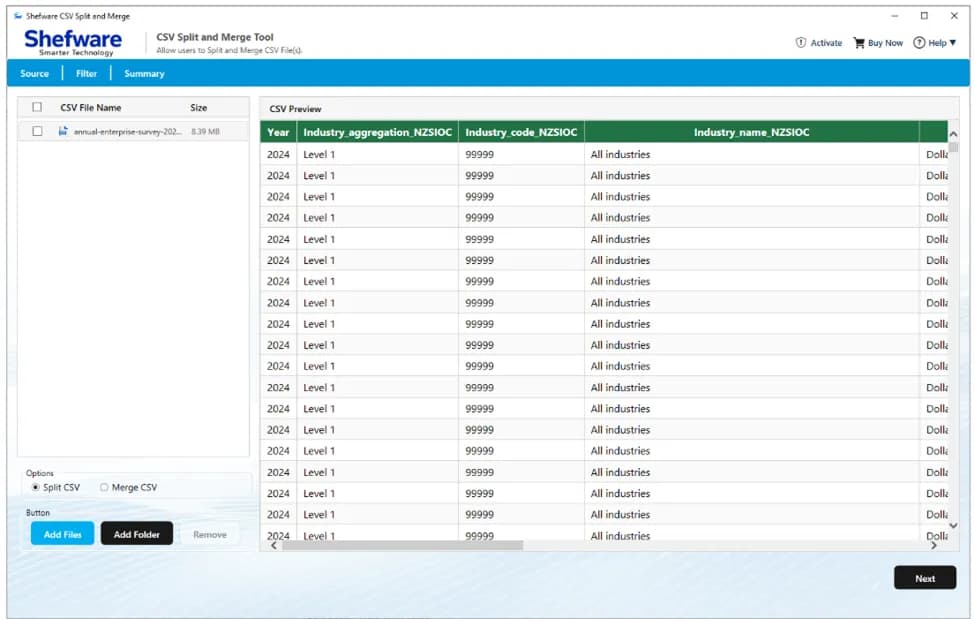
Easily split CSV into multiple files without losing any data. The software helps you manage oversized CSV files for easier editing, sharing, importing, and storage while preserving the original data structure.
The Shefware CSV Splitter Tool works seamlessly with all major Windows operating systems, including Windows 11, 10, 8.1, 8, and 7. Enjoy a smooth and reliable experience across supported Windows environments.
Process your CSV files entirely on your local system without requiring an internet connection. Your data remains private and secure throughout the splitting process, ensuring complete confidentiality.
Keep the original column headers in every split CSV file for better readability and compatibility. Each output file is ready for analysis, import, or further processing without additional modifications.
| Features | Free | Full |
|---|---|---|
| Split CSV by Record Count | Up to 25 rows only | Unlimited |
| Split CSV by File Size | Limited | |
| Split CSV by Row Count | Limited | |
| Add Multiple CSV Files | ||
| Batch Split Multiple CSV Files | Limited | |
| Add Folder Option | Limited | |
| Preview CSV Data | ||
| Preserve Header Rows | ||
| Create Separate Output Folder | Limited Folders | |
| Choose Destination Path | ||
| Export to CSV, XLSX, XLS, XML & ODS | Limited Files | |
| Processing Summary | ||
| Windows Compatibility | ||
| Free Technical Support | ||
| Free Software Updates |
Download Free Demo & Check System Requirements
Size: 236 MB
Version: 1.0.0.0
Hard Disk
1 GB space required
RAM
Minimum 4 GB RAM (Recommended 8 GB)
Processor
Intel® Core™ 2 Duo CPU E4600 @ 2.40GHz 2.39GHz or above
Operating System - Windows 11, 10, 7(64 bit), Windows Server 2025
Prerequisites - .NET Framework 10
This CSV Splitter Tool is fast, reliable, and incredibly easy to use. Splitting large CSV files by row count took just a few minutes, and every output file was perfectly organized.
Data Analyst
Got questions about the Shefware CSV Splitter Tool? Find quick answers below.
.a8160392.png&w=640&q=75)