Convert multiple document formats to PDF instantly
Create secure and professional PDF documents from multiple Word file formats such as DOTM, DOCX, DOC, DOT, DOTX, etc. Convert single or multiple Word documents to PDF securely with complete accuracy and offline access, and no Microsoft Word installation.
★ Converts 5 word files to PDF format in the free demo version.
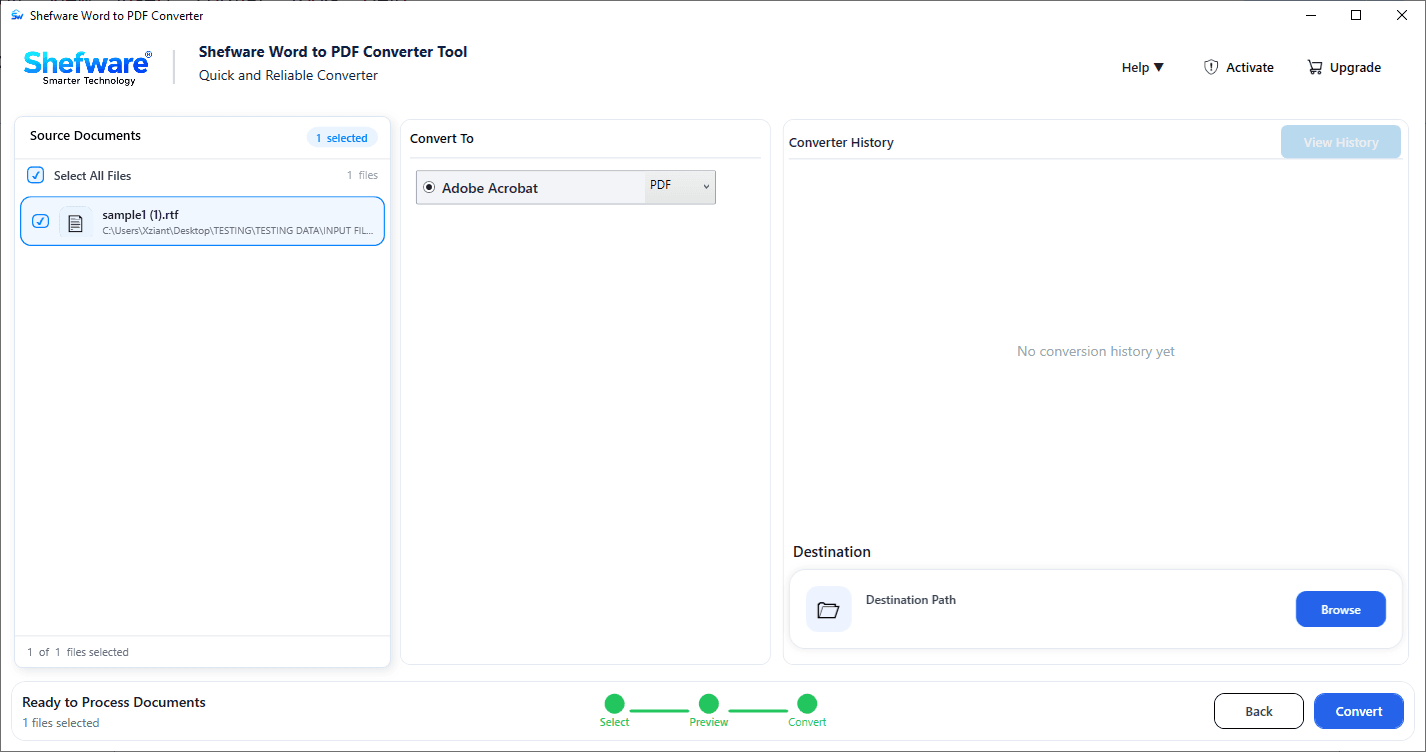
Convert Word files such as DOC, DOCX, DOCM into PDF format.
Batch convert multiple files into PDF format quickly and efficiently.
Preserve the original layout, fonts, images, and structure with word to pdf converter.
Retain bookmarks, tables, charts, and images with high-quality output.
View the detailed conversion status report using MS Word DOCX to PDF Converter.
Maintain Unicode and multilingual characters accurately.
View and read Word documents to ensure accurate PDF output.
Export converted PDF files to the desired destination folder.
Supports all Windows operating systems.
Converts 5 files into separate PDFs in the demo version using the free word to pdf converter.
| Supported Format | Commonly Used For |
|---|---|
| DOC | Creating and editing older Microsoft Word documents |
| DOCX | Creating reports, resumes, contracts, letters, and other documents. |
| DOCM | Managing documents with built-in VBA macros. |
| DOT | Creating reusable templates in older Word versions. |
| DOTX | Building standardized templates for business documents. |
| DOTM | Designing macro-enabled templates with predefined automation. |
| RTF | Sharing formatted text across different applications. |
| ODT | Creating documents in LibreOffice and OpenOffice. |
Share Word documents as PDF files to ensure the content, formatting, and layout are preserved while creating reports, contracts, invoices, etc.
Convert Word files into professional-quality PDFs with word file converter to pdf for secure sharing, printing, and long-term record management.
Create PDF files that can be opened on any device without Microsoft Word, reducing compatibility issues and making documents easier to share, store, and access.
Preserve the original fonts, images, tables, and page layout during conversion, throughout the conversion process for professional PDF documents.
Securely convert password-protected Microsoft Word documents to PDF. The Word to PDF Converter supports encrypted DOC and DOCX files while preserving formatting, fonts, images, tables, hyperlinks, and document structure. Your original Word files remain unchanged throughout the conversion process.
Convert Word documents to PDF while preserving Unicode and ANSI characters. The software accurately retains multilingual text, special symbols, emojis, and language-specific characters for professional-quality PDF output.
Evaluate the Shefware Word to PDF Converter with the demo version before purchasing the software. Convert word to PDF Converter Free to convert up to 5 word documents into the desired output format, and preview Word files before conversion. The trial version applies a watermark to converted files. Upgrade to the licensed version to generate watermark-free output.
Convert Word files such as DOC, DOCX, DOCM, DOT, etc into PDF formats with high accuracy using word to pdf format converter.
View and read document content, text, images, tables, and page layout before the conversion process.
Convert multiple Word documents at once for faster and more efficient processing.
Generate detailed reports to monitor the status, including source file, source location, output location, output format, and message.
Maintain the original fonts, formatting, images, tables, and document structure.
Convert word to PDF while preserving ANSI and Unicode characters, multilingual text and special symbols.
Create professional-quality PDF files while preserving the original structure, formatting, fonts, images, tables, and page layout.
Apply appropriate page formatting to preserve the original document layout in the converted PDF.
Convert different Word files into PDF formats quickly and accurately by following the easy steps below.
Choose the source Word document for conversion, including DOC, DOCX, DOCM, DOT, and other formats.
Click Add Files or add a folder to upload your Word documents. Upload a single document or multiple documents for batch conversion.
View and read the selected Word documents to verify content, formatting, tables, images, and page layout before starting the conversion process.
Select PDF as the output format to convert the Word documents.
Browse and choose the destination path where the converted PDF files will be stored after the conversion process.
Click Convert to start the conversion process. Once completed, verify the converted PDF files and view the detailed conversion report for tracking and monitoring purposes.
Navigate the software with ease through a clean and intuitive interface designed to simplify conversion.
Get quick and reliable professional support from the support team to resolve technical queries and other issues.
Convert single or multiple Word files quickly and easily while maintaining consistent performance and dependable output quality.
Create high-quality PDF files that accurately preserve the original formatting and fonts, images, and tables.
| Feature | Free Trial | Professional Version |
|---|---|---|
| Convert Word Documents to PDF | ✓ | ✓ |
| Supported Word Formats (DOC, DOCX, DOCM, DOT, DOTX, DOTM, RTF, ODT) | ✓ | ✓ |
| Batch Conversion | Limited | Up to 50 files |
| Maximum Files per Conversion | Up to 5 Files | Based on Selected License Plan |
| Preview Word Documents Before Conversion | ✓ | ✓ |
| Preserve Original Fonts & Formatting | ✓ | ✓ |
| Retain Images, Tables, & Bookmarks | ✓ | ✓ |
| Maintain Original Page Layout | ✓ | ✓ |
| Preserve ANSI & Unicode Characters | ✓ | ✓ |
| Support for Multilingual Documents | ✓ | ✓ |
| High-Quality PDF Output | ✓ | ✓ |
| Automatic Page Formatting | ✓ | ✓ |
| Detailed Conversion Status Report | ✓ | ✓ |
| Save PDFs to Any Destination Folder | ✓ | ✓ |
| No Microsoft Word Required | ✓ | ✓ |
| Compatible with All Windows Operating Systems | ✓ | ✓ |
| Watermark-Free PDF Output | ✗ | ✓ |
| Commercial & Business Use | ✗ | ✓ |
| Free Software Updates | ✗ | During License Period |
| Dedicated Technical Support | Limited | Priority Support |
| Best For | Product Evaluation | Personal & Professional Use |
Download Free Demo & Check System Requirements
Size: 243 MB
Version: 1.0.0.1
Hard Disk
1 GB space required
RAM
Minimum 4 GB RAM (Recommended 8 GB)
Processor
Intel® Core™ 2 Duo CPU E4600 @ 2.40GHz 2.39GHz or above
Operating System - Windows 11, 10, 7(64 bit), Windows Server 2025
Prerequisites - .NET Framework 10
I had many Word files such as DOC, DOCX, RTF that needed to be converted into PDF format. Thanks to Shefware, I found a quick solution, and I use it almost daily for my work.