Open Any File Online with Document Viewer Tool Easily
Open and view documents securely with Shefware Document Viewer. Access files offline on your local machine without uploading data or compromising privacy.
Open and see multiple document formats from an individual platform.
Document viewer without Microsoft Office, Adobe Reader, and third-party applications.
Offline document reader no internet required.
Preview documents while managing the original format and layout.
Supports bulk file loading for quick document access.
Quick switching between document previews.
Available and compatible only with Windows.
View big-sized files without any performance problems.
Various users receive documents but do not have MS Office or other applications installed. The tool helps in accessing files quickly.
Sometimes organizations work with confidential files. Offline viewing ensures that documents remain secure on the local machine.
Users can access old reports, contracts, invoices, and archived files without needing the original application.
Opening documents via applications consumes time. A document viewer offers fast access to file contents.
Open and read all format document viewer windows from an individual platform. We support Word documents, Excel spreadsheets, PowerPoint presentations, PDFs, text files, and other formats.
Preview document content while protecting the original format and appearance. The tool manages fonts, tables, images, page layouts, format, and document sequence, making sure of accurate viewing.
Access and see documents without any internet connection. All the process takes place locally on the system; you can safely review files anytime while keeping sensitive details private.
Add one or more files or overall folders in one operation. It helps users quickly access and review huge collections of documents without opening individual files.
Include multiple documents and see a particular file simultaneously. We offer a layout for multitasking and reviewing related documents with no screen deformation.
Runs smoothly on Windows 11, 10, 8.1, 8, and 7. There are no compatibility problems, no crashes, and it just gives a steady experience on all platforms.
Allow users to easily remove unwanted or mistakenly added documents from the viewer list with a single click.
The document stays entirely secure because all file processing happens on the local machine. No files get uploaded to outside servers, making sure more privacy.
See the documents without needing any internet connection.
No file uploads or cloud processing are contained.
Manage document structure, layouts, images, tables, and formats.
Preview documents safely without changing the original file.
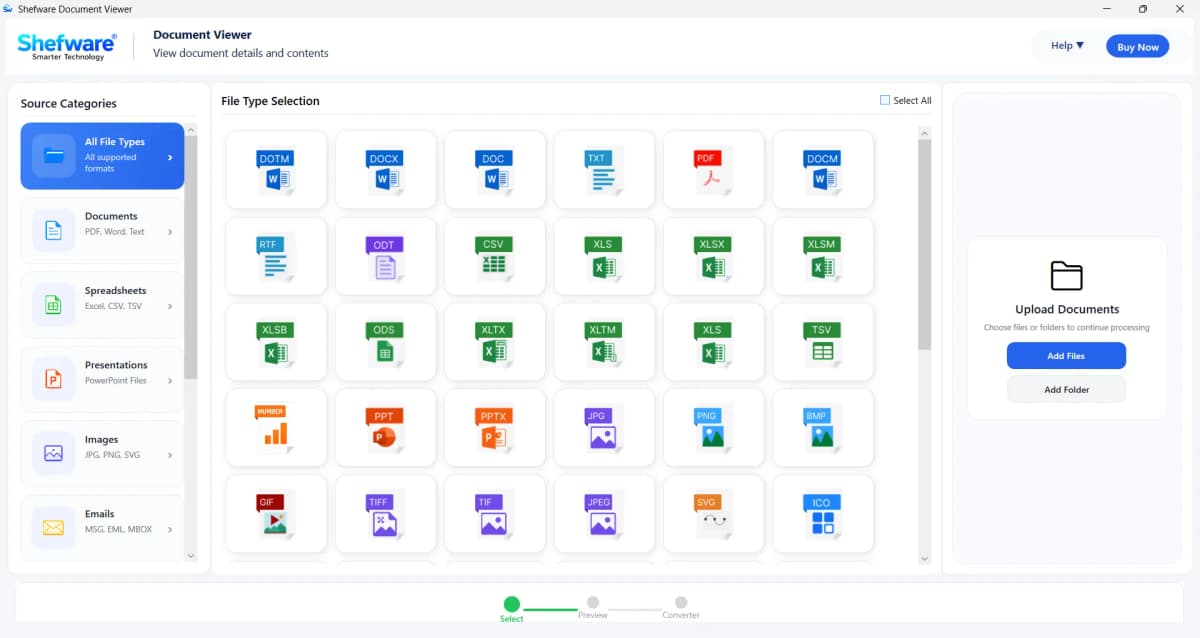
Download the software and select the particular file category like documents, spreadsheets, presentations, images or choose All File Types to see supported formats.
Choose the particular formats you want to open and preview. The tool supports various formats containing DOC, DOCX, PDF, TXT, XLS, JPG,.webp, and more.
Click on Add Files or Add Folder to browse and upload documents from the local system. Various files can be selected simultaneously for fast processing.
The application scans the selected files and shows a detailed preview. Review document content, format, images, tables, and page layouts before the conversion.
Easy navigation for both beginners and experts as tool provides intuitive interface.
Ideal for IT administrators, legal teams, business for safe document access.
Add, organize search, and manage various documents via centralized interface to users.
Built with best technology to manage both small and large documents effectively.
Download Free Demo & Check System Requirements
Size: 196 MB
Version: 1.0.0.1
Hard Disk
1 GB space required
RAM
Minimum 4 GB RAM
Processor
Intel® Core™ 2 Duo CPU E4600 @ 2.40GHz 2.39GHz or above
Operating System - Windows 11, 10, 7(64 bit), Windows Server 2025
Prerequisites - .NET Framework 10
The Shefware offline document reader software free has made the process simple. The preview feature is precise, and filter option helps to locate file in seconds.
Digital Records Manager
Ans. A Document Viewer is a tool that permits users to open and read multiple document formats without downloading third-party applications.
Ans. Yes, it allows you to open Word, Excel, and PowerPoint files without MS Office.
Ans. No, the document viewer is entirely offline and does not need any internet connection.
Ans. All the files are processed locally on the system and never get uploaded online.
Ans. Yes, the software has the bulk processing feature, which loads and previews in bulk.
Ans. The tool assists DOC, DOCX, XLS, PPT, TXT, CSV, XML, HTML, XLSX, PPTX, and many others.